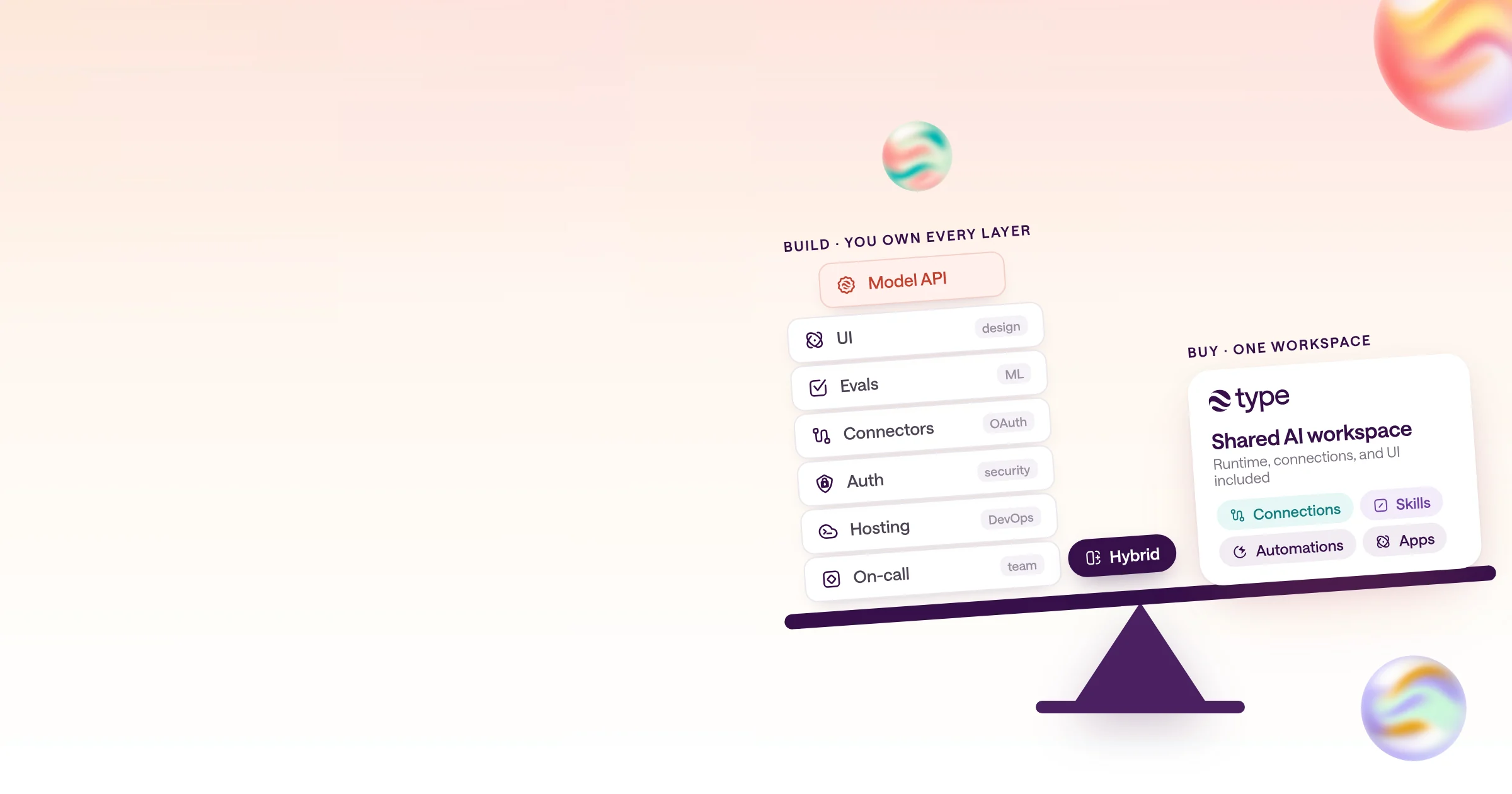
Decision guide
Build vs buy AI agents: a decision guide for teams
When to build, when to buy, what building really costs, and the hybrid most teams choose.
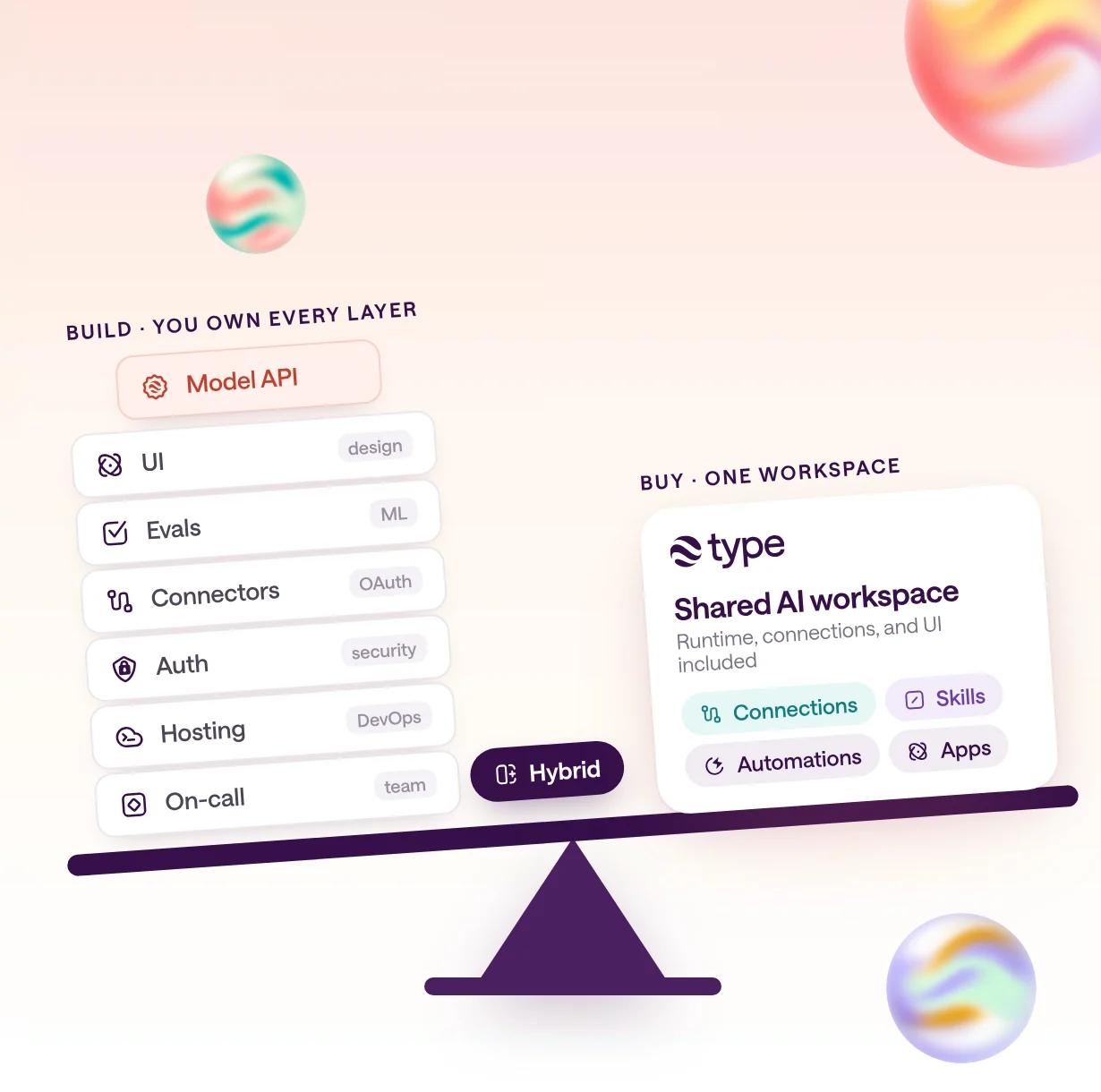
Should you build or buy AI agents?
Build when the agent is your product's differentiation, needs data, latency, or compliance no vendor can meet, and you have engineers to own it. Buy for everything else, and use a hybrid when you need custom pieces on top of a bought platform.
With AI agents, the cheap part is the demo. A working prototype on a modern agent SDK is quick to build. The expensive part is everything that keeps it useful after launch: connectors that stay authorized, permissions, evals, monitoring, on-call, and an interface people outside engineering will use.
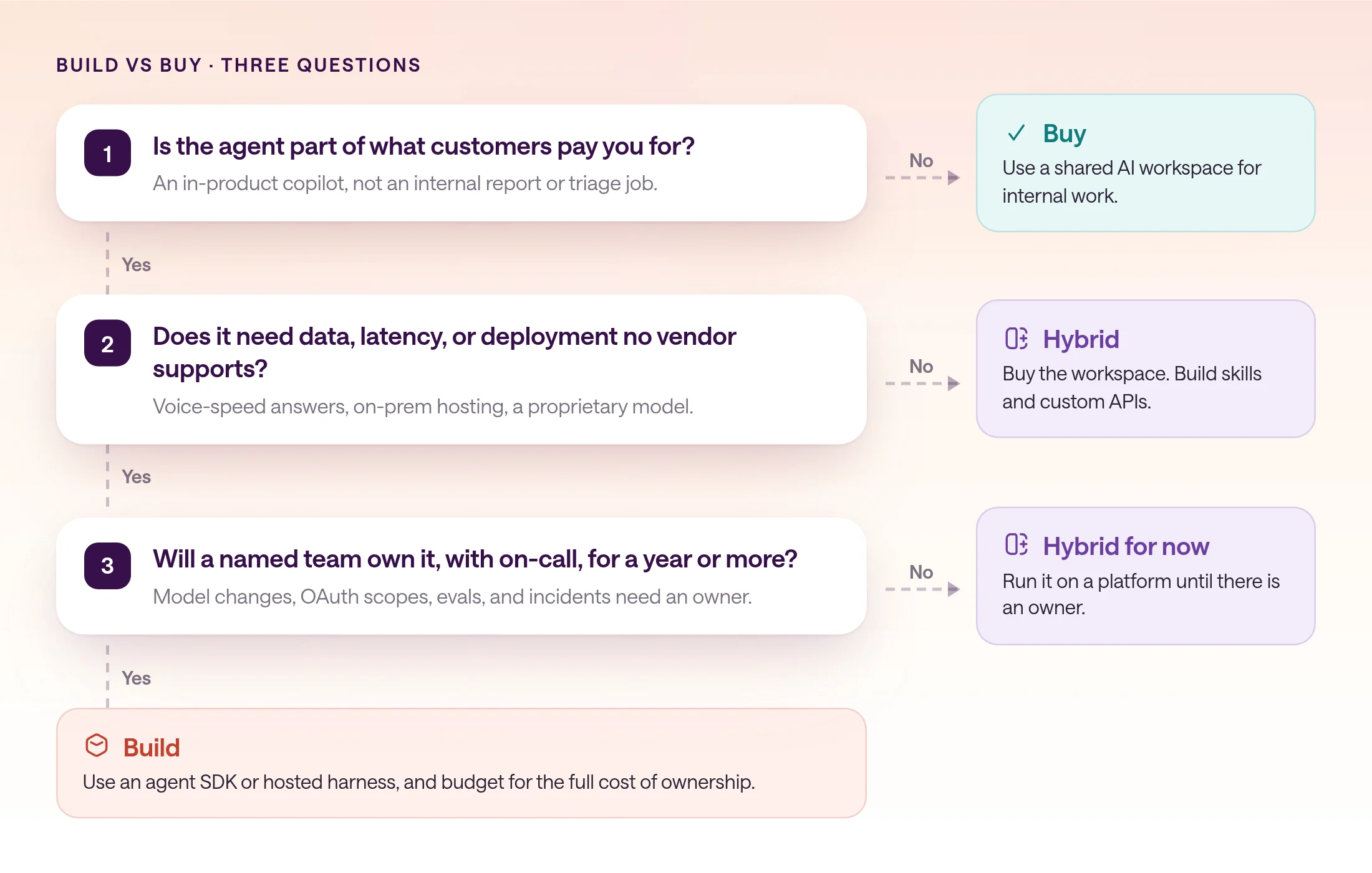
So the question is not whether your engineers can build an agent. It is whether the agent is worth owning. Ask three questions: Is it part of what customers pay you for? Does it need data, latency, or deployment no vendor supports? Will a named team own it, including on-call, for at least a year?
Three yeses mean build, though you can still rent the runtime instead of operating it: managed agent runtimes host the agent loop and sandbox while you build the product around them. A no to the first usually means buy, because internal reports, research, triage, and drafting are not where your advantage lives. Mixed answers point to a hybrid: buy the workspace and runtime, then build the skills and custom APIs that encode what is specific to your business.
When does building your own AI agents make sense?
Build when the agent is the product or a core part of it, when it needs data, latency, or a deployment model vendors cannot offer, and when an engineering team will own it like any other production system.
Core differentiation is the strongest reason. If customers choose you for your in-app copilot or underwriting assistant, you want full control over its behavior, roadmap, and unit economics.
Unique data, latency, or compliance needs are the second. An agent that must answer inside a voice call, run next to a proprietary model, or stay on infrastructure you control may need more than a general platform offers. Check details, though: many requirements are already covered, and some build options have limits too. OpenAI's hosted Agents API, for example, currently supports data residency only in the United States.
The third is ownership. A production agent depends on model versions, tool APIs, OAuth scopes, and prompts that all change underneath it. Without a team that owns it like the rest of your stack, a custom build decays quietly.
When should you buy an AI agent platform instead?
Buy when the work is internal, spans tools your team already uses, and the people using it are not engineers. That covers most reporting, research, triage, drafting, and operations work.
Most agent work teams want right now is internal: a weekly KPI report, lead research, support triage, or a finance close checklist. None of it differentiates your product, all of it touches several SaaS tools, and most of the people who need it are not engineers.
For that work, a bought platform wins on time to value and maintenance. The vendor keeps connectors working, ships the interface, and handles model upgrades. Your team spends its time on the part that is yours: the instructions, the rules, and the judgment about what good output looks like.
Buying also lets you learn before you commit. Running ten workflows on a platform for a quarter shows which two matter. For a side-by-side of platforms built for this, see the best AI agent platforms for teams.
What does it really cost to build AI agents in house?
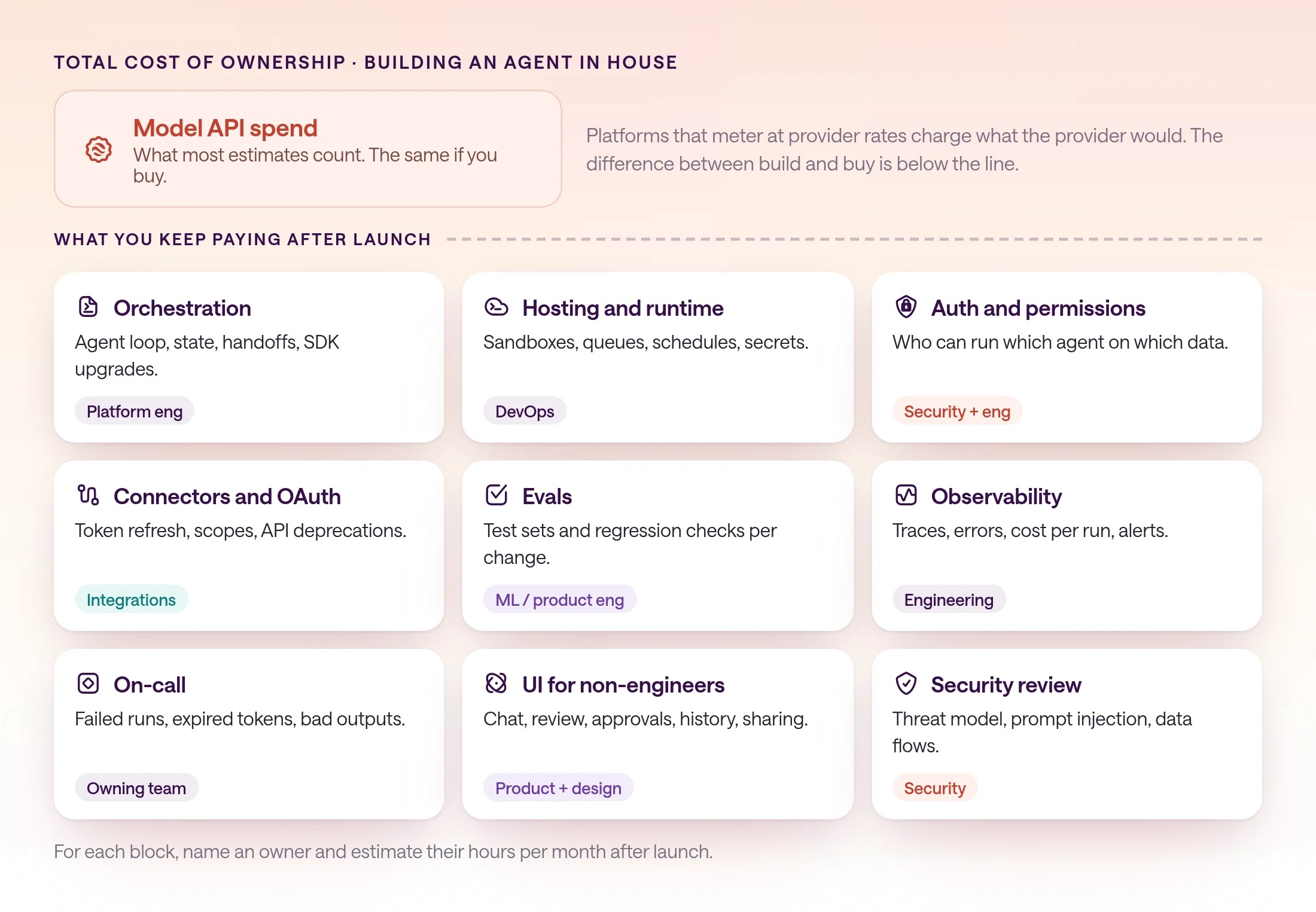
Model API spend is one of at least ten cost components. The rest are mostly engineering time: orchestration, hosting, auth, connectors, evals, observability, on-call, a UI for non-engineers, and security review.
Build estimates usually start with token prices because they are easy to look up. They are also the line item that is the same either way: platforms that pass model usage through at provider rates charge what the provider would. The difference is everything else.
The table has no dollar figures, because they depend on your salaries, scale, and stack. Use it as a checklist: for each row, name the owner and estimate their hours per month after launch, not just during the build.
| Cost component | What it involves | Who usually owns it | If you buy a workspace |
|---|---|---|---|
| Model API spend | Tokens for every run, retries, long contexts, and evals. | Engineering, with finance reviewing the bill | Still paid. In type.com it is metered at provider rates, or covered by a connected Claude or ChatGPT subscription. |
| Orchestration framework | Agent loop, tool calling, state, handoffs, and upgrades as SDKs change. | Platform or product engineering | Vendor runs the agent loop. |
| Hosting and runtime | Servers or sandboxes, queues, schedules, secrets, scaling. | Platform engineering or DevOps | Vendor hosts it. You choose triggers and schedules. |
| Auth and permissions | Who can run which agent with which data, per user and per tool. | Security with engineering | Configure the vendor's controls and verify them. |
| Connectors and OAuth maintenance | API clients, token refresh, scope changes, and vendor API deprecations. | Integrations engineering | Vendor maintains packaged connectors. You own custom APIs. |
| Evals | Test sets, grading, and regression checks for each prompt or model change. | ML or product engineering | Still partly yours: test runs and review of real output. |
| Observability | Traces of tool calls, errors, cost per run, and alerts. | Engineering | Vendor shows runs and tool calls. You review them. |
| On-call | Someone to fix failed runs, expired tokens, and bad outputs. | The owning team | Shared: vendor runs the platform, your admins fix connections. |
| UI for non-engineers | Chat, review, approvals, history, and sharing for business users. | Product and design | Included. |
| Security review | Threat model, prompt injection, data flows, vendor and model review. | Security | Still needed, as a vendor review instead of a design review. |
What are your options for building AI agents?
Building means an agent SDK or framework, such as the OpenAI Agents SDK, the Claude Agent SDK, LangGraph, or CrewAI, running on infrastructure you operate, or a managed agent runtime, such as Claude Managed Agents, Amazon Bedrock AgentCore, or OpenAI's Agents API, that runs the agent loop for you.
The OpenAI Agents SDK is an MIT-licensed library for Python and TypeScript with a small set of primitives, agents, handoffs, and guardrails, plus tracing, sessions, and human-in-the-loop support, and it works with 100+ models beyond OpenAI's. Anthropic's Claude Agent SDK gives you the agent loop, built-in tools, hooks, subagents, and permissions that power Claude Code, in Python and TypeScript, inside a process you operate. LangGraph is a lower-level orchestration runtime with durable execution and human-in-the-loop, strongest when you want fixed steps and model-driven steps in one graph, and CrewAI is an MIT-licensed Python framework for multi-agent crews and flows.
Self-hosting is where the work starts. Anthropic's hosting guide for the Claude Agent SDK suggests 1 GiB of RAM, 5 GiB of disk, and 1 CPU per agent, notes that a minimal container costs roughly $0.05 an hour, and says token costs usually dominate. Every running agent is a long-lived process with local state, so you also own scaling, session storage, and isolation between users.
Plan for the platform underneath to change. OpenAI's AgentKit announcement now says Agent Builder and Evals will be unavailable from November 30, 2026. Migrations like that are part of the cost of building.
| Option | What you get | Where it runs | What you still build |
|---|---|---|---|
| OpenAI Agents SDK | Agent loop, handoffs, guardrails, tracing, sessions; 100+ models. | Your servers | Hosting, connectors, permissions, UI, evals process. |
| Claude Agent SDK | Claude Code's tools, hooks, subagents, and permissions in your process. | Your containers: about 1 GiB RAM, 5 GiB disk, and 1 CPU per agent | Hosting, multi-user access, connectors, UI. |
| LangGraph | Durable, stateful graphs mixing fixed and model-driven steps. | Your servers, or LangSmith Deployment | Models and tools, UI; tracing via LangSmith or your own. |
| CrewAI | Multi-agent crews and flows with guardrails, memory, and observability. | Your servers, or CrewAI AMP | Connectors, permissions, UI. |
| Claude Managed Agents | Anthropic runs the loop, a container per session, and vaults for secrets. | Anthropic's cloud; $0.08 per session-hour plus tokens | Users, permissions, most triggers, and the interface. |
| Amazon Bedrock AgentCore | Runtime, Gateway, Identity, Memory, and Policy for any framework. | AWS microVMs; default $0.0895 per vCPU-hour plus memory | Triggers and the interface for business users. |
| OpenAI Agents API | A managed Codex harness with sessions, in public beta. | OpenAI-hosted or self-hosted sandbox | Users, permissions, triggers, and the interface. |
What does a managed agent runtime handle, and what is still yours?
A managed agent runtime takes over the bottom of the stack: the agent loop, a sandbox for each session, and usually a way to keep secrets out of the agent's code. The team-facing top is still yours to build: users and permissions, triggers, connections to your tools, and the interface people use.
Managed runtimes are the middle path between building and buying, and the newest. Claude Managed Agents, in public beta, runs Claude in a fresh container for each session and charges $0.08 per session-hour plus tokens. Amazon Bedrock AgentCore runs agents from any framework in microVMs, billed per second at default rates of $0.0895 per vCPU-hour and $0.00945 per GB-hour. OpenAI's Agents API, Microsoft Foundry hosted agents, and Google Agent Runtime fill the same role on their own clouds.
What they don't include is the layer your team touches. Claude Managed Agents adds cron schedules in public beta, Foundry has routines, and AgentCore and the OpenAI Agents API start agents from API calls that your own scheduler makes. Your application still signs users in, decides who may run what, and shows the results, and connecting company tools is mostly up to you, even with services like AgentCore Gateway.
That makes a runtime the right base for an agent inside your product, and a team platform the right choice for agents that do your own team's work. For prices and limits across eight options, see our guide to Claude Managed Agents alternatives.
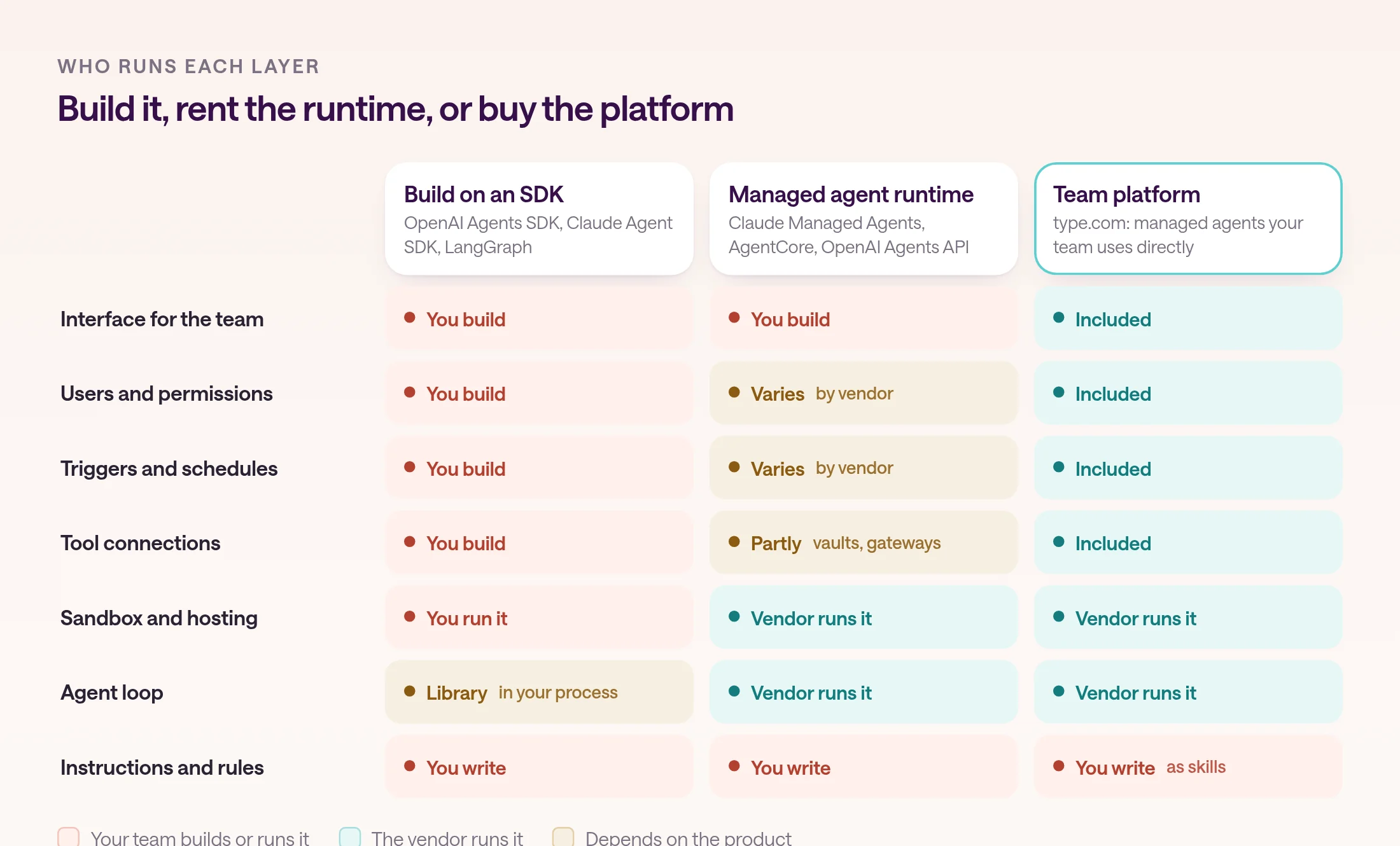
| Capability | Build on an SDK | Managed agent runtime | type.com |
|---|---|---|---|
| Agent loop | A library in your process | Runs on the vendor's servers | A managed Claude or Codex agent |
| Sandbox | Your containers or VMs | A container or microVM per session | An isolated Linux sandbox |
| Secrets | Your secrets manager | Vaults or an identity service keep them out of agent code | Connections per Space; code automations never receive a provider credential |
| Triggers | Your scheduler and webhooks | Varies: cron in beta for Claude Managed Agents; API calls for AgentCore | Schedules, Slack, GitHub, Linear, webhooks, email, and RSS |
| Failures | Your retries and alerts | Varies by vendor | A schedule pauses after three failed runs in a row; failing code pauses for a repair |
| Run history | Your logs and traces | Vendor consoles for developers, such as Claude's session viewer | A thread for every run that the team can read |
| Cost | Your compute plus tokens | Runtime fee plus tokens | Plans from $50/mo for 2 members with $100 of AI usage |
What are your options for buying AI agents?
Buying ranges from agents inside a suite you already use, to vertical agents for one job, to managed agent platforms such as type.com that run many workflows across your tools.
Suite agents live inside an assistant your company already pays for. OpenAI's workspace agents in ChatGPT are shared agents for ChatGPT Business, Enterprise, and Edu that run in the cloud and can be used in ChatGPT or Slack. If your company is standardized on ChatGPT, that is a genuine strength: no new tool to roll out.
Microsoft Copilot Studio and Salesforce Agentforce do the same inside Microsoft 365 and Salesforce, priced in credits: Copilot Studio at $200 a month per 25,000 Copilot Credits, and Agentforce at $500 per 100,000 Flex Credits or $2 per conversation. They are strongest when the work and its data already live in that suite.
Vertical agents do one job deeply, such as customer support or sales development. They are a good buy when one workflow dominates and the vendor's domain tuning would be hard to replicate.
Managed agent platforms sit across functions. In type.com, each team works in a Space with channels and threads, connects its tools once, and runs managed agent automations on Claude or Codex from schedules, Slack, GitHub, webhooks, and email. It fits teams that want many internal workflows in one place without running infrastructure.
Open-source assistants sit between building and buying: the software is free, but you run, secure, and update it. If that is on your list, see OpenClaw vs managed agent platforms.
If you are comparing type.com with a specific tool, see Claude Team vs type.com and Cowork vs type.com.
What does the hybrid approach look like, and where does type.com fit?
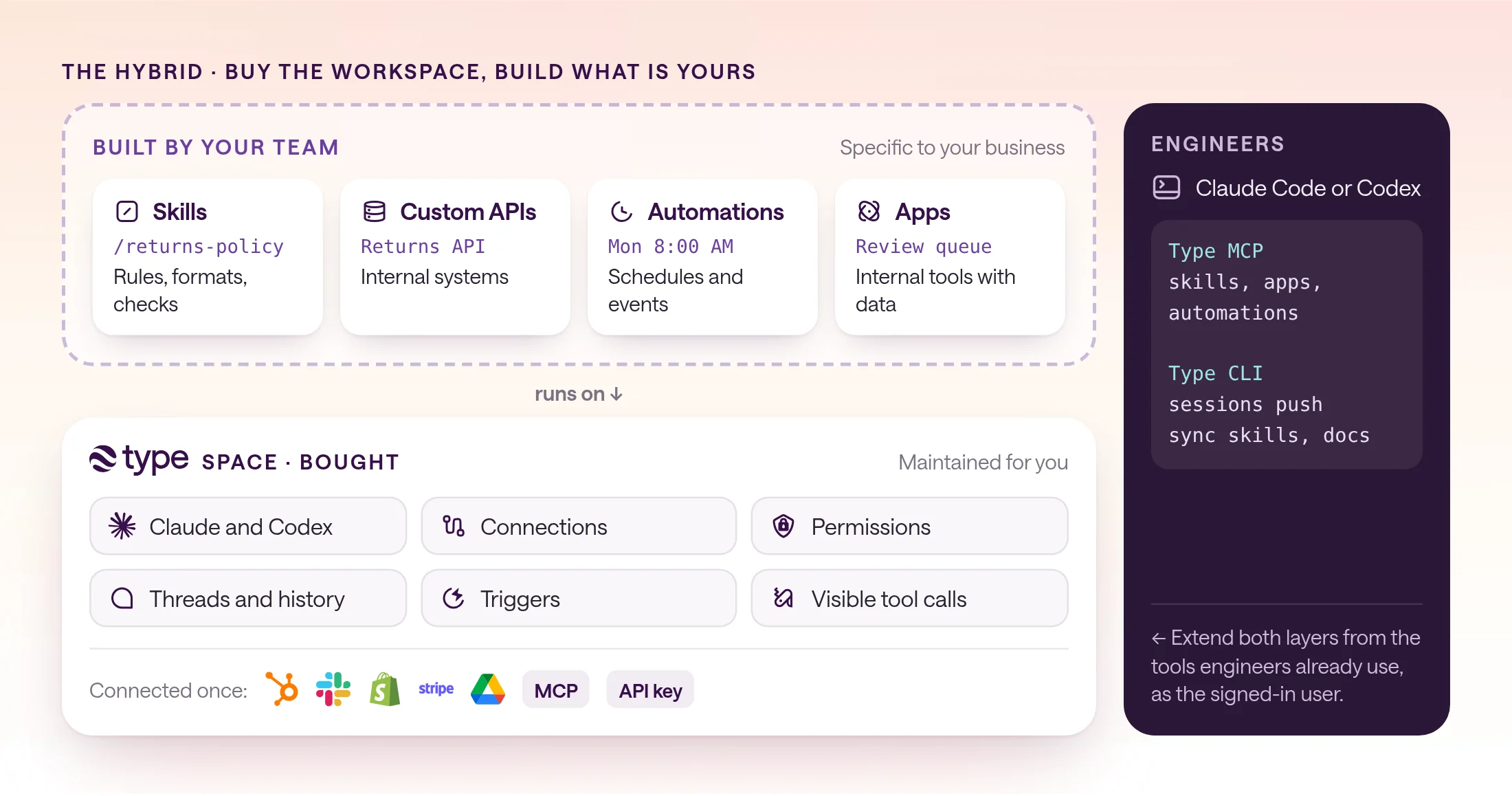
Buy the workspace and runtime, then build the parts that are specific to you: skills that encode your rules, custom APIs for internal systems, automations, and apps. type.com is designed for that split.
Most of what makes an agent yours is not infrastructure. It is your ICP, report format, escalation rules, and internal data. Those are worth building. The agent loop, OAuth refresh, chat interface, and run history are not.
In type.com, connections cover packaged tools, API keys, hosted MCP servers, and personal or organization accounts, and they are added once per Space. For an internal system with no connector, add a custom API with an API key or OAuth. type.com stores the credential, so it never lands in a prompt.
Your rules live in skills, SKILL.md packages the whole team shares and can suggest edits to. Automations run them from a schedule, webhook, app event, email, RSS, or Slack, and apps turn them into internal tools with their own data, such as a review queue or tracker.
Engineers keep their own tools. type.com MCP lets Claude, ChatGPT, and other MCP clients create skills, build apps, run automations, and call connected integrations, as the signed-in user. The type.com CLI develops apps locally, syncs documents and skills, and pushes a Claude Code or Codex session into a thread so the rest of the team can pick it up.
How do you score build vs buy for your team?
Score eight questions from 0 to 2, where 2 favors building. A total of 0 to 5 means buy, 6 to 10 means hybrid, and 11 to 16 means build.
Score each workflow, not the company: you can build your in-product agent and buy everything else. Put the would-be owners and the users in the room, because each group underweights the other's costs.
Paste the checklist into any AI chat with a short description of the workflow. Treat the scores as a starting point for discussion, not the decision.
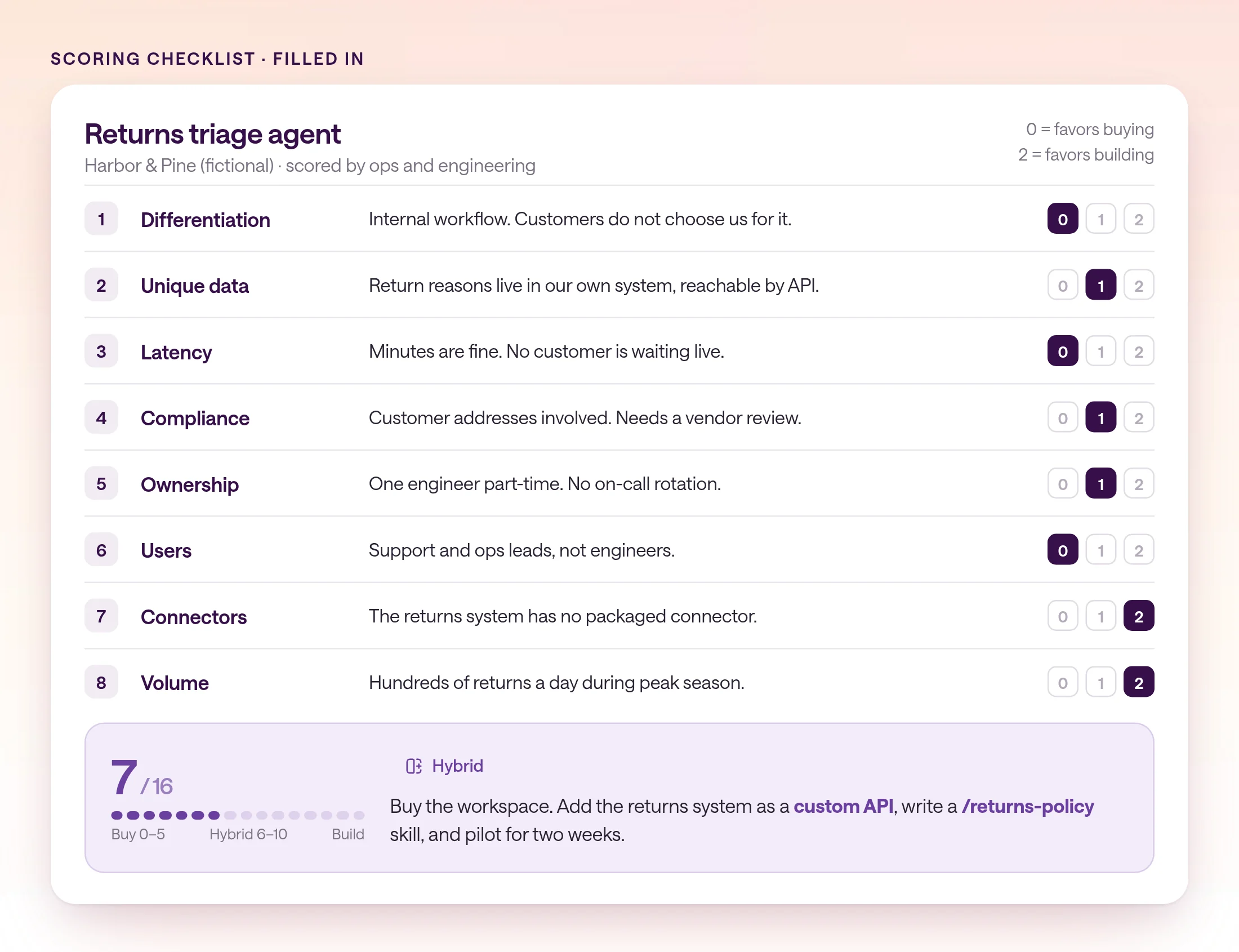
Build vs buy scoring checklist
Score this AI agent workflow on each question from 0 to 2 (2 favors building). Explain each score in one sentence. Workflow: [describe the job, who uses it, and which systems it touches] 1. Differentiation: Is the agent's behavior part of what customers pay us for? 2. Unique data: Does it need data or models no vendor can connect to, even through a custom API? 3. Latency: Does it need responses faster than a few seconds? 4. Compliance: Is there a hosting, residency, or retention rule no shortlisted vendor can document? 5. Ownership: Is there a named team that will own it with on-call for 12+ months? 6. Users: Are the people using it engineers who are fine without a UI? 7. Connectors: Are the systems it needs missing from vendor connector catalogs? 8. Volume: Will it run so often that per-run cost tuning justifies custom work? Total: 0-5 buy, 6-10 hybrid (buy the workspace, build skills and custom APIs), 11-16 build. List the two answers that would most change the result if we were wrong.
How do you test the decision before committing?
Pick two workflows, run them on a bought workspace for two weeks with real data, and measure use and output quality before deciding to build anything.
A short pilot settles more than a long debate. It shows whether people use the workflow, what it really needs, and where output falls short. If a workflow later earns a custom build, you start with a spec of what good looks like.
type.com starts with a 14-day trial that includes $10 in AI usage. Paid plans start with type.com Basic at $50 a month for two members and $100 of AI usage; see pricing for the other tiers.
Before any automation writes to a system of record, set up approval workflows for AI agents and review permissions in a shared AI workspace.
- 1
Pick two workflows with a clear owner
Choose one recurring job, like a weekly report, and one event-driven job, like inbound lead research. Name the person who judges whether the output is good.
- 2
Connect only what those workflows need
Add the tools to one Space as connections. Use organization connections for shared systems and a custom API for any internal service.
- 3
Write the rules as a skill
Put formats, definitions, and checks in a skill so the team can suggest edits instead of rewriting prompts.
- 4
Test privately, then enable
Automations start paused. Run a test with a real event, fix the skill or instructions, and enable it once the output is right.
- 5
Score again at the end
Rerun the checklist with what you learned. Keep what works on the platform, and write a spec for anything that now clearly needs a custom build.
- Build only what customers pay for or what no vendor can support.
- Model spend is the same either way. The difference is the engineering time around it.
- Most teams should buy the runtime and build the skills and custom APIs.
- Score each workflow separately, and pilot before you commit to a build.
Frequently asked questions
Should we build or buy AI agents?
Build when the agent is part of what you sell, needs data, latency, or deployment no vendor supports, and engineers will own it long term. Buy for internal work. Most teams land on a hybrid: buy the workspace, build the skills and custom APIs.
What does it cost to build AI agents in house?
Model API spend is one line. You also own orchestration, hosting, auth, connector maintenance, evals, observability, on-call, a UI for non-engineers, and security review, mostly as ongoing engineering time.
What is the best alternative to building AI agents in house?
A managed agent platform such as type.com, where your team connects its tools once per Space, writes repeatable workflows as skills, and runs them as automations, without running agent infrastructure. Engineers can still extend it with custom APIs, type.com MCP, and the type.com CLI.
Which frameworks do teams use to build their own agents?
Common choices are the OpenAI Agents SDK, the Claude Agent SDK, LangGraph, and CrewAI, all free to use. Managed agent runtimes such as Claude Managed Agents, Amazon Bedrock AgentCore, and OpenAI's Agents API run the agent loop for you in a hosted sandbox, while you still build the product around it.
Is a managed agent runtime building or buying?
A bit of both. A runtime such as Claude Managed Agents, at $0.08 per session-hour plus tokens, or Amazon Bedrock AgentCore, billed per second of compute, runs the agent loop and sandbox, so you don't operate that infrastructure. You still build users, permissions, triggers, and the interface, so for your own team's work it is closer to building than buying.
Does buying mean giving up control over data and permissions?
Not entirely, but check it. In type.com, connections are assigned per Space, AI acts with the access of the person who started the work, and tool calls are visible in the thread. If you need on-premises hosting or controls a vendor cannot document, that is a reason to build.