Comparison

Type vs Claude Cowork

Cowork is a very good agent for one person. You describe a task, Claude works through it with your connectors, and the session stays yours. Type puts that same class of agent in a channel your team shares, so the work is visible, continuable, and something a coworker can pick up.

14-day free trial. Runs on Claude and Codex.

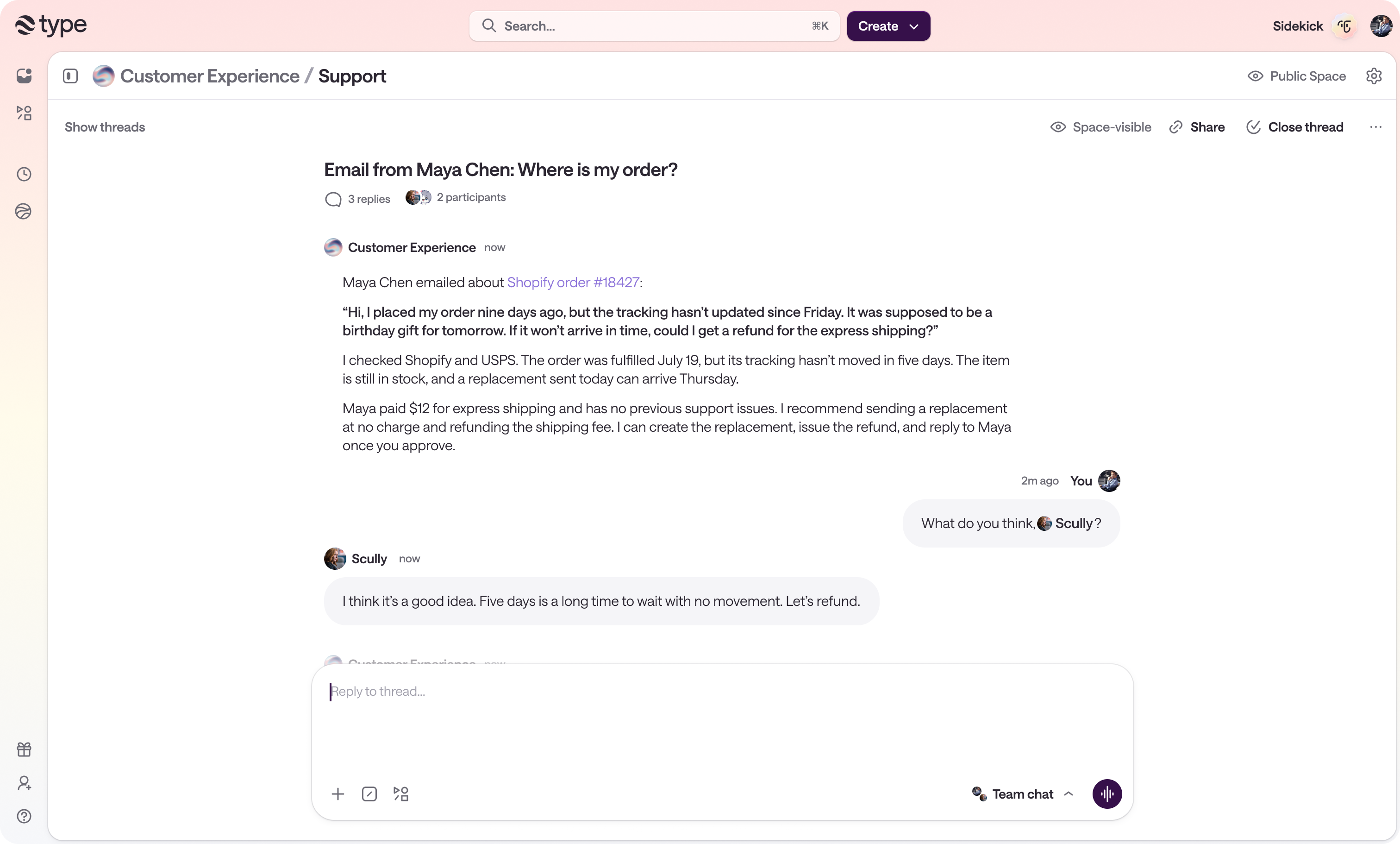
A space-visible Type support thread where an agent reviews a late Shopify order, recommends a free replacement and a shipping refund, and two teammates discuss the recommendation before approving it
One agent session, two people reading it. The recommendation, the discussion, and the approval all sit in the same thread.

Short answer

Claude Cowork is Anthropic's agent for knowledge work inside claude.ai. You hand it a task, it works with your personal connectors and files, and you watch it go. Sessions run either in a cloud sandbox Anthropic hosts, which is the default and is labeled beta, or locally with code execution inside a VM on your own machine. It is genuinely strong at long multi-step work, and Type does not claim otherwise.

The gap is who the work belongs to. Anthropic's own limitations list says sessions can't be shared with others. Chat memory doesn't carry into Cowork, and inside Cowork memory works in projects only. Cowork projects aren't shareable with teammates. On Team plans the Cowork toggle is organization-wide, so either everyone has it or nobody does. Sharing runs through live artifacts, which are desktop-only, unavailable on Pro and Max, carry no external or public links, and connect to the viewer's own access rather than yours.

Type is a shared workspace where the agent works in a channel. Anyone in that Space can hand it work, read the whole session, correct it, or continue a thread somebody else started. Memory belongs to the Space, so what one person taught the agent is there for the next person. Type runs Claude and Codex, so picking Type is not picking a weaker model. Keep Cowork for your own work and use Type where more than one person touches the result.

What decides it

The three differences that decide it

Both products run capable Claude agents. These are the structural choices underneath that.

Who can see the session

Type

The channel can. Work happens in a thread the Space shares, so a coworker reads the agent's reasoning, the tools it called, and the files it made, then continues it.

Cowork

You can. Anthropic's limitations list states sessions can't be shared with others, and sharing a live artifact instead is desktop-only, Team and Enterprise only, and carries no per-person recipient selection.

Where the knowledge accumulates

Type

In the Space. Memory, skills, and connections belong to the team, so one person's correction shows up in the next person's thread and in every scheduled run.

Cowork

In each person's account. Chat memory doesn't carry into Cowork, memory inside Cowork works in projects only, and Cowork projects aren't shareable with teammates.

What an admin can actually set

Type

Connections are organization-level and assigned per Space, kept separate from personal ones, and revocable one at a time.

Cowork

On Team plans the Cowork toggle is organization-wide with no narrower control, connectors are authorized per person, and local sessions store history admins can't manage or export.

The seam

Cowork gives one person an agent. Type gives a team one.

Start with what Cowork does well, because it is a lot. You describe a task in plain language, Claude plans it, works through the steps with your connectors and your files, and comes back with real output. Cloud sessions run in a sandbox Anthropic isolates per session and hosts, with connector tokens held outside the sandbox and egress proxied. Sub-agents split up big jobs. Scheduled tasks run with nothing of yours online. It writes .xlsx and .pptx natively. Zapier, Thomson Reuters, HubSpot, Brainlabs, and Airtree are named on Anthropic's own page. This is a serious product from the company that makes the model.

Now read Anthropic's limitations list, which is refreshingly blunt. The first item says sessions can't be shared with others. Look at what that removes. Nobody can watch the run and catch a wrong assumption at step three. Nobody can take over when you go on holiday halfway through a migration. Nobody learns the technique by watching you use it. There is no observer, no comment, no assignment, and no handoff, because the session is a single-player surface by design.

Type starts one layer up. The unit of work is a thread inside a Space, and the Space is a shared computer for a team with its own channels, connections, skills, memory, and automations. When an agent works in that thread, everyone with access is already looking at it. Your coworker sees the plan, the tool calls, the intermediate files, and the answer, and can jump in with a correction or take the whole thing over. Nothing had to be shared, because it was never private.

  • The thread is shared by default, including the agent's reasoning and tool calls
  • Anyone in the Space can correct a run or continue it after somebody else stops
  • Space-visible work means people learn the pattern by watching a coworker use it
  • Agents can pause and ask the channel, not just the person who started the task

Memory

What one person teaches the agent, everyone should get

Anthropic is specific here, so we will be too. What Claude remembers about you in chat doesn't carry into Cowork sessions yet, and inside Cowork, memory is supported in projects only. Projects reach every surface now and save to your Claude account, and Anthropic's developer docs still state that Cowork projects aren't synced to the cloud or shared with other people. Chat projects can be shared on Team and Enterprise. Cowork projects cannot.

So the correction you made on Tuesday, the one where you explained that your fiscal quarters start in February and the churn number in that dashboard excludes trials, lives in your account. Your coworker running the same analysis on Thursday will get the same wrong answer you got, and will fix it the same way you did.

Type memory belongs to the Space. A correction lands where the next question will be asked, and scheduled automations read the same memory a person's thread does. Skills go further: a skill is a procedure your team keeps improving, with an owner and version history, where a coworker's edit arrives as a change request the owner approves. Each one reports 30-day usage, top users, and run history, so you can see which procedures the team actually relies on. Teams that want engineering rigor keep a GitHub registry as the source of truth.

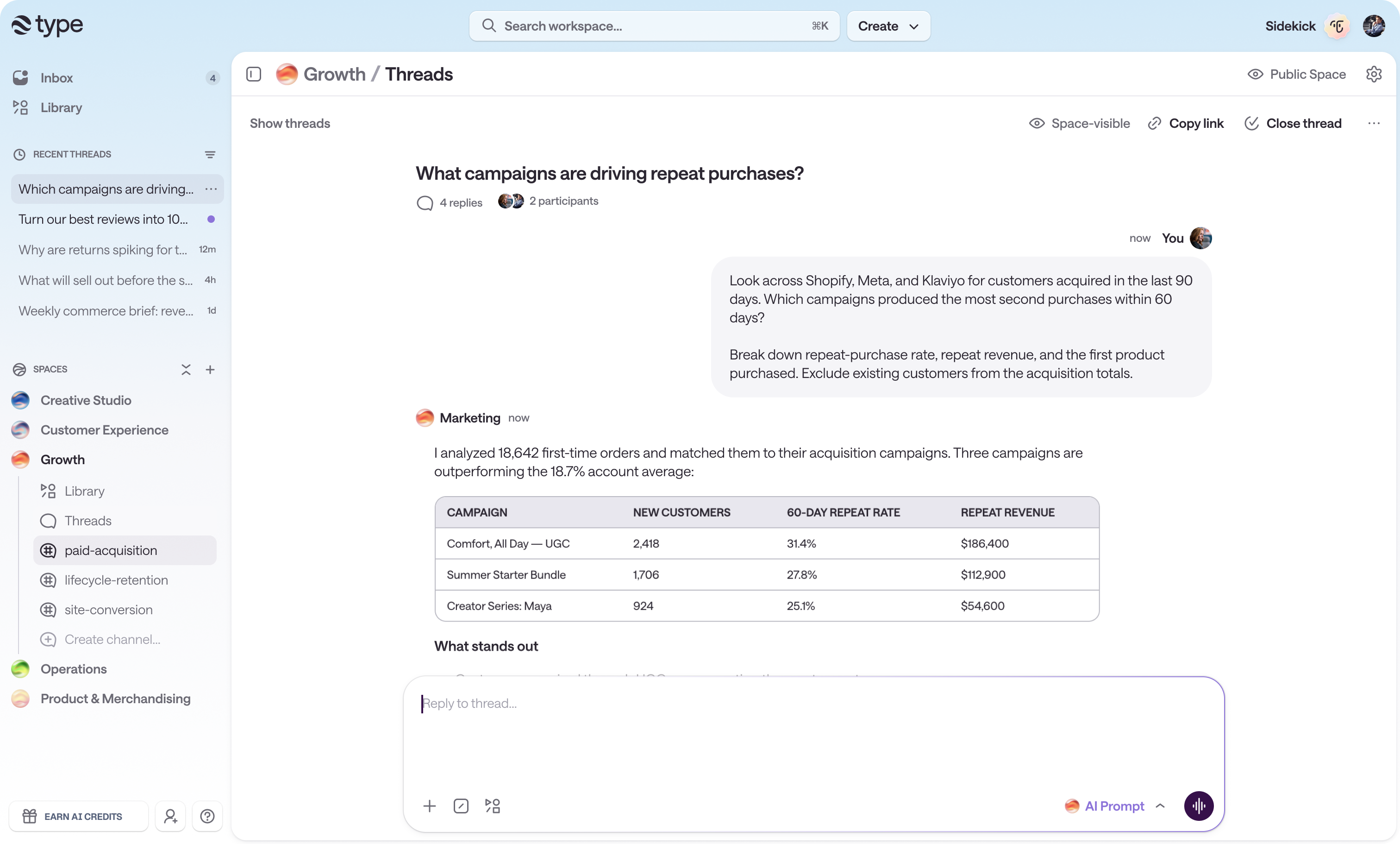
A Type Growth space with a shared thread where a teammate asks which campaigns drive repeat purchases and an agent answers with analysis across Shopify, Meta, and Klaviyo
A shared Type thread. The question, the analysis, and the answer are all in the channel, so the next person starts from what this one established.
  • Space-level memory that scheduled runs read too
  • Skills with an owner, version history, and owner-approved change requests
  • 30-day usage, top users, and run history per skill
  • Import .skill files and push live Claude Code or Codex sessions in from the CLI

Slack

Your team already has a place they talk. Use it.

Cowork has no Slack entry point, and this is not an oversight on Anthropic's part. Its docs draw the line explicitly: Cowork lives in claude.ai chat, Claude Tag lives in Slack channels, and the guidance is that team work goes to Claude Tag while personal work goes to Cowork or Claude Code. So the Slack path exists, and it is a different product with a different runtime and different credentials. Claude Tag runs on the Claude Code engine with service-account credentials an admin sets per channel, rather than your Cowork session with your connectors and your project context.

Type connects to the Slack you already run. Mention an agent in a channel and it answers there. Route a Slack user group to a Space so the right people reach the right agent. DM Sidekick as a native Slack assistant and it answers with the same context, skills, and memory it has in Type. An agent mid-task can stop and ask a clarifying question through an interactive Slack modal, and the answer goes back into the running work.

The reason this matters is adoption. Teams do not fail to use AI because the model is not good enough. They fail because the tool is one more place to check, and the person who most needs it never opens it. Type does not ask your coworkers to move. The channels stay where they are, the notifications already work on their phones, and the agent shows up in the conversation they are already having.

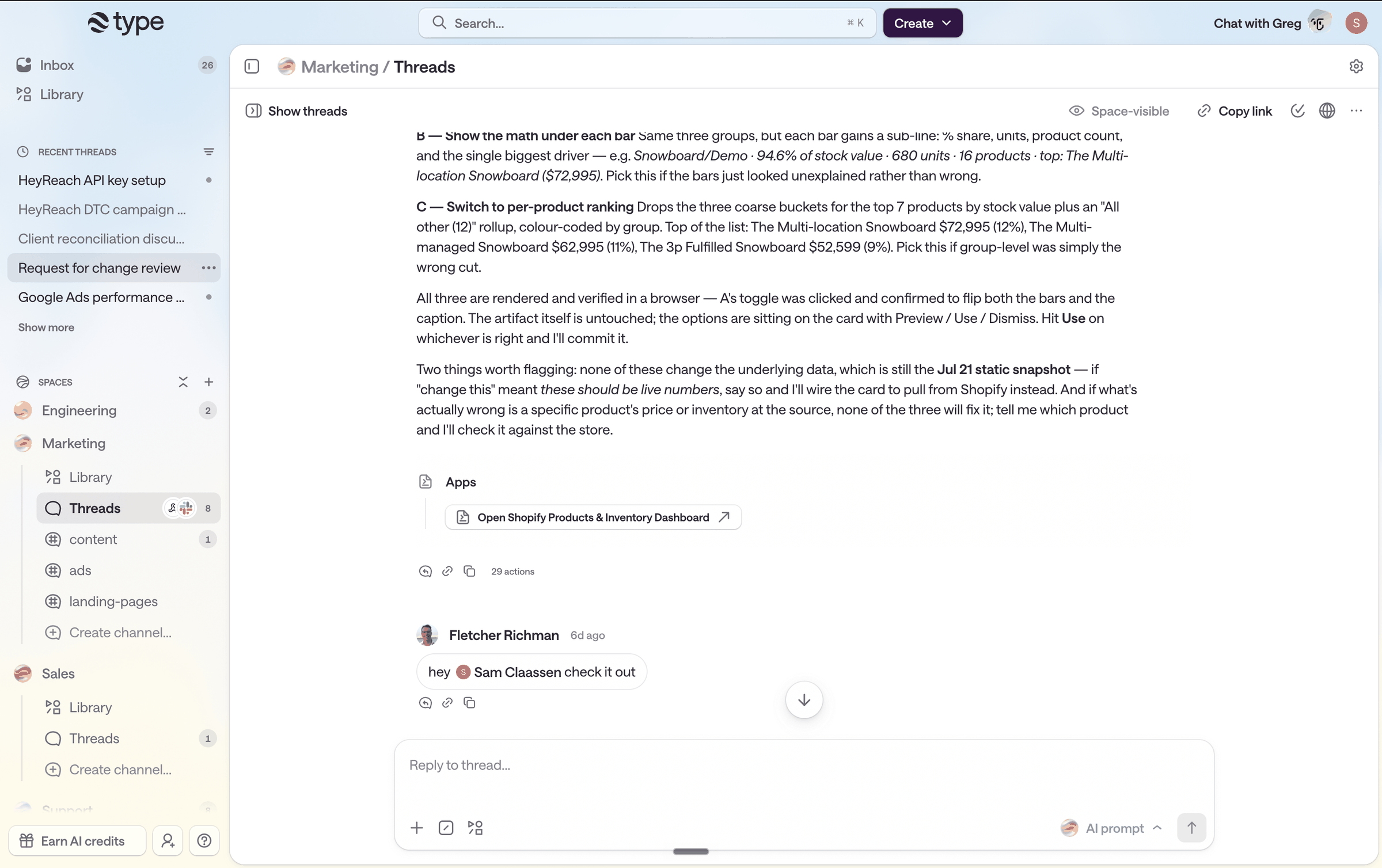
A Type Marketing Space whose Threads channel shows a Slack connection icon, with an agent's analysis, a linked Shopify dashboard app, and a teammate reply in the thread
A Marketing Space with Slack connected to the channel. The team keeps working in Slack while the agent's work lives in Type.
  • Mention an agent in any Slack channel and it replies in the thread
  • Route a Slack user group to a Space
  • Sidekick as a native Slack assistant with the same context, skills, and memory
  • Interactive Slack modals for mid-task questions and approvals

Rollout

All-or-nothing is a hard way to introduce agents

Anthropic states it directly: the Cowork toggle is organization-wide, so either all members have access or none do, and Team plans don't have access to the controls that would change that, which leaves Cowork all-or-nothing on Team. If you wanted to start with the support team and expand once you trust it, that is not a setting you have.

The plan gating cuts across it in ways worth mapping before you commit. Auto mode is documented as Pro and Max only. Computer use is Pro and Max only, and Team and Enterprise have no access to it. Live artifact sharing runs the other way, Team and Enterprise only and unavailable on Pro and Max. Dispatch is a Pro and Max beta running one continuous thread with no way to manage multiple threads. Which capabilities your team gets depends on which plan they are on, and the answer is different for each capability.

Type rolls out by Space. Give the support team a Space with Zendesk, Shopify, and the two skills they need, and nobody else's setup changes. An admin connects a tool once for the organization and assigns it to the Spaces that should have it, personal connections stay separate from organization ones, and every connection is revocable on its own. When a connection breaks, reconnecting repairs it in place and every Space that used it keeps working. Neither product's story here is finished: Type does not ship SAML or SCIM today, and Anthropic's Enterprise plan does.

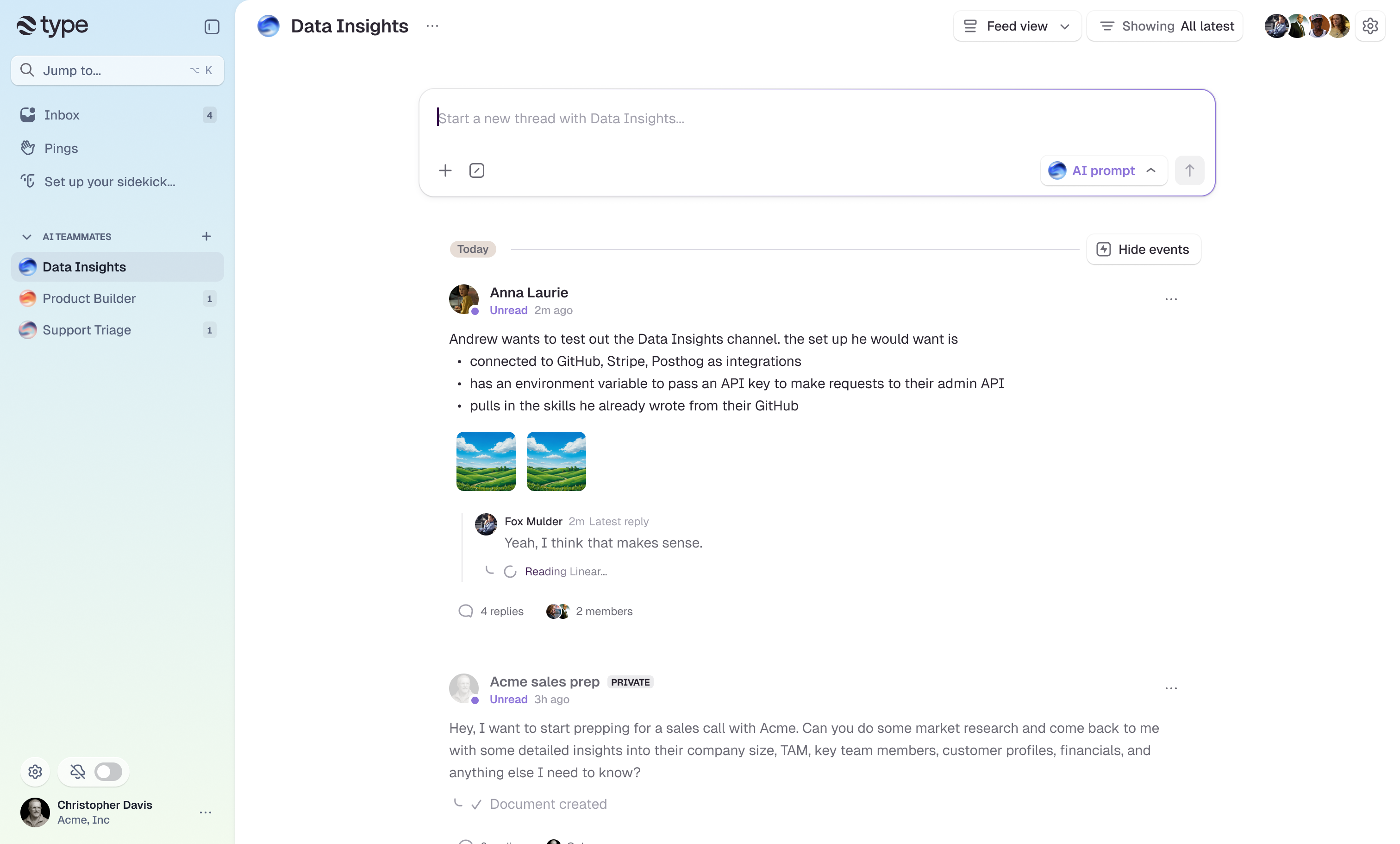
The Type workspace running in a browser with Data Insights, Product Builder, and Support Triage listed as AI teammates in the sidebar
Separate Spaces for separate teams, each with its own connections, skills, and memory.
  • Roll out one Space at a time instead of one organization at once
  • Organization connections assigned per Space, separate from personal ones
  • Revocable connections that repair in place when they break
  • Six blueprints carrying 21 skills and 16 scheduled automations between them

Cost

Shared work changes what each seat buys

Cowork is priced through Claude plans, and the numbers are reasonable on their own terms. Pro is $20 per month, or $17 billed annually. Max is $100 at 5x usage or $200 at 20x. Team is $25 per standard seat monthly, $20 annually, with premium seats at $125 or $100 and a two-member minimum against a 150-seat ceiling. Enterprise is $20 per seat per month billed annually with usage billed separately at API rates, needing 20 seats self-serve or 50 through sales. Anthropic also notes that working on tasks with Cowork consumes more of your usage allocation than chatting with Claude, so a heavy Cowork user is a heavier seat than a chat user.

Both products price access by team size, but each seat buys a different collaboration model. In Cowork, another seat still gets a private session rather than access to continue yours. In Type, every team member included in the plan can read and continue the same shared threads.

Type Basic is $50 per month for 2 team members and $100 of included AI usage. Pro is $100 for 4 members and $200 of usage. Enterprise plans cover 20, 40, or 60 members for $250, $500, or $750 with twice that price in included usage. AI is metered at the provider's published API rates, and requests through connected Claude or ChatGPT subscriptions do not use the workspace allowance.

  • Plans for 2, 4, 20, 40, or 60 team members
  • One shared pool of AI usage across included team members
  • AI metered at provider published rates, with no Type markup
  • Bring a Claude or ChatGPT subscription and those requests are not metered

Full comparison

Type and Cowork, feature by feature

Grouped by the decisions teams actually make when they evaluate the two.

Who the work belongs to

Sharing a session

Type

The thread is shared by default. Anyone in the Space reads the full session, including the agent's reasoning, the tools it called, and the files it produced.

Cowork

Anthropic's limitations list states that sessions can't be shared with others. Cowork does follow you across your own devices, so you can check progress from a phone, which is one person on several screens.

Continuing someone else's work

Type

Open the thread and keep going. The context, the connections, and the produced files are all still there, so a coworker picks up a half-finished task without a handoff conversation.

Cowork

No handoff exists. There is no way to assign a task to a colleague, add an observer, comment on a run, or hand a session over.

Seeing what the team is working on

Type

Channels and a feed. Work is visible to the Space, so people notice what the agent is being used for and copy the pattern.

Cowork

Your sessions are yours. Anthropic notes that for Cowork, who sees the work is just you, and reserves shared-channel work for Claude Tag instead.

Reviewing before something ships

Type

Agents can pause and ask, including through an interactive Slack modal, and the whole channel sees the question and the answer.

Cowork

Permission prompts go to the person running the session. Anthropic notes that live artifacts don't ask for permission before using connectors, even when your session mode would normally require approval.

Memory and reusable knowledge

What the agent remembers

Type

Memory belongs to the Space, so a correction one person makes carries into the next person's thread and into scheduled runs.

Cowork

Anthropic states that what Claude remembers about you in chat doesn't carry into Cowork sessions yet, and that within Cowork, memory is supported in projects only.

Reusable procedures

Type

Skills have an owner and version history, a coworker's edit arrives as a change request the owner approves, and each skill reports 30-day usage, top users, and run history. A GitHub registry can be the source of truth.

Cowork

Skills and plugins are real and admins can require or default-install them from a marketplace. Once installed, each person's use of them happens inside their own private session, so nothing accumulates as team knowledge.

Project context

Type

A Space carries its own channels, connections, skills, memory, files, and automations, and everyone in it inherits all of that.

Cowork

Projects reach every surface now and save to your Claude account, and Anthropic's developer docs still state Cowork projects aren't synced to the cloud or shared with other people. Chat projects are shareable on Team and Enterprise; Cowork projects are not.

Bringing existing work in

Type

Push a live Claude Code or Codex session into a Space from the CLI, upload .skill files in the same format Claude uses, and connect outside AI clients through a hosted OAuth-protected MCP server.

Cowork

Cowork reads your local files and your connected sources, which is a strong on-ramp for your own material. There is no path for bringing a teammate's session or context in.

Where your team works

Slack

Type

Mention an agent in a channel, route a Slack user group to a Space, or DM Sidekick as a native Slack assistant with the same context, skills, and memory it has in Type.

Cowork

Cowork has no Slack entry point. Anthropic's own comparison puts Cowork in claude.ai chat and Claude Tag in Slack channels, and mentioning Claude in Slack starts a Claude Tag session on the Claude Code engine with admin-set service-account credentials rather than a Cowork session with your connectors.

Browser and desktop

Type

Full workspace in any browser, plus a Mac app where the agent can drive your own logged-in browser session for tools with no API.

Cowork

Web, desktop for macOS and Windows, and mobile, with cloud sessions in beta as the default. Live artifacts and plugins that include local MCP servers are desktop-only.

Mobile

Type

The mobile browser works today and Slack covers phones, with an iPhone app coming.

Cowork

Cowork runs on mobile, which is ahead of Type here. Dispatch adds sending work from your phone to your desktop, in beta for Pro and Max, and Anthropic notes it runs as one continuous thread with no way to start a new thread or manage multiple threads.

Getting work in from outside

Type

Every Space has an inbound email address, so someone with no account can start a thread. Webhooks, app events, and RSS feeds trigger work too.

Cowork

You start sessions yourself, or on a schedule you set. There is no inbound address or webhook a customer or a system can hit.

What the agent can do

Model and harness choice

Type

Claude and Codex, with the harness, model, reasoning level, and speed selectable per thread, as a Space default, and per automation.

Cowork

Claude, and Anthropic's own agent loop, which is the same architecture behind Claude Code. If you want Anthropic's harness specifically, this is where to get it.

Computer and browser control

Type

Agents operate a full desktop and can record video of what they did, and the Mac app lets an agent drive your own logged-in browser.

Cowork

Computer use exists and Anthropic documents it as available on Pro and Max plans only, with Team and Enterprise having no access to it at this time. Auto mode carries the same Pro and Max restriction.

Files it produces

Type

Documents, spreadsheets, decks, images, and video, plus co-edited documents with live presence and AI-built apps with persistent data the whole team keeps using.

Cowork

Native .xlsx and .pptx output, which is good and lands as real files. Live artifacts add an interactive result, gated to Team and Enterprise, stored on your computer, and reachable only by an in-org link with no per-person selection.

Parallel work

Type

Sub-agents split a large task and report back into the thread, so the channel sees the whole shape of the work.

Cowork

Sub-agent coordination is built in and works well. The results land in your session.

Recurring work

Type

Schedules, webhooks, app events, RSS, Slack, and inbound email, with each run posting into the channel where teammates can read it or take it further.

Cowork

Scheduled tasks run with no device online, which is a real strength. The run reports back into the session of the person who created it.

Integrations and permissions

Integration catalog

Type

Nearly 1,000 native integrations across 16 categories, connected once and assigned to the Spaces that should have them, plus a custom API connector for anything else.

Cowork

Anthropic's connector catalog plus any MCP server you add, authorized as you. Anthropic notes the always-allow setting for connector tools is off by default, and that most custom connectors don't annotate their tools, so every tool on those connectors is gated behind a prompt.

Who manages connections

Type

An admin connects a tool once for the organization and assigns it per Space. Personal and organization connections stay separate, every connection is revocable, and a broken one reconnects in place.

Cowork

Each person authorizes their own connectors. That is the intent, and it means an admin has nothing to grant or revoke on someone else's behalf, and no view of what any individual wired up.

What the agent can reach

Type

An agent acts with the access of the person and the conversation that started the work rather than everything connected in the workspace, with file-level and folder-level scoping for sources like Google Drive.

Cowork

The session runs with your access. On a shared live artifact that inverts: Anthropic states shared artifacts use the viewer's access, not yours, so what an artifact shows changes with who opens it.

Prompt injection

Type

Connections are scoped per Space and per requester, so the blast radius of a bad instruction is the access that thread already had.

Cowork

Anthropic is direct that the risk of prompt injection attacks is non-zero. It also notes that network egress permissions don't apply to the web fetch or web search tools or to MCPs.

Administration

Turning it on for part of the team

Type

Spaces are the unit. Give a team a Space with the connections and skills it needs and leave the rest of the org alone.

Cowork

Anthropic states the Cowork toggle is organization-wide, so either all members have access or none do, and that Team plans don't have access to the controls that would narrow it, leaving Cowork all-or-nothing there.

Where session data lives

Type

In the workspace, readable by the people with access to that Space and exportable as ordinary files.

Cowork

Cloud sessions live with the member's Claude account. For local sessions Anthropic states conversation history is stored on the user's computer, is not subject to Anthropic's standard data retention policies, and cannot be centrally managed or exported by admins.

Audit trail

Type

The thread is the record. Anyone with access to the Space reads what the agent did, in order, without asking for a log export.

Cowork

Anthropic publishes OpenTelemetry streaming to a SIEM. Its Cowork product page says Cowork activity is not yet captured in audit logs or the Compliance API while its support docs say Cowork via mobile and web is captured in the Compliance API, so confirm the current state before relying on either.

Endpoint visibility

Type

Agents run in the cloud per Space, so there is no local VM for your security tooling to see into.

Cowork

For local sessions, Anthropic answers plainly that endpoint detection tools cannot inspect activity inside the VM.

Enterprise identity

Type

Members and admins are managed in workspace settings. Type does not ship SAML or SCIM today.

Cowork

Enterprise plans include SCIM, audit logs, custom data retention, and role-based access, which is more than Type publishes.

Cost

Price

Type

Basic is $50 per month for 2 team members and $100 of included AI usage. Pro is $100 for 4 members and $200 of usage. Enterprise plans cover 20, 40, or 60 members with larger allowances.

Cowork

Pro is $20 per month, or $17 billed annually. Max is $100 per month at 5x usage and $200 at 20x. Team is $25 per standard seat per month or $20 billed annually, and $125 per premium seat or $100 billed annually, with a two-member minimum and a 150-seat ceiling. Enterprise is $20 per seat per month billed annually plus usage at API rates, needing 20 seats self-serve or 50 through sales.

What counts against usage

Type

AI usage is metered at the provider's published API rates on a pool the whole workspace shares. Requests that run through a personal Claude or ChatGPT subscription you connect are not metered at all.

Cowork

Anthropic notes that working on tasks with Cowork consumes more of your usage allocation than chatting with Claude, and each seat has its own allocation rather than a shared pool.

Paying for people who mostly read

Type

Every person with workspace access counts toward the plan's included team members, whether they run agents or mostly read shared threads.

Cowork

Cowork comes with a seat. Anyone who needs to see the work needs a plan of their own.

Where Cowork is the better choice

Cowork is built by the company that makes the model, and there is a lot it does that we would not pretend to match. If your situation is one of these, use it.

  • For your own work, it is excellent. If the task is yours start to finish and nobody else needs to see it, a private session is the right shape and Type's channel adds nothing.
  • It runs Anthropic's own agent loop, the same architecture behind Claude Code, straight from the people who trained the model.
  • Computer use and auto mode are available on Pro and Max, which is a lower price of entry than a team plan for a single person who wants them.
  • Cowork runs on mobile today. Type's iPhone app is still coming, and the mobile browser plus Slack is what covers phones in the meantime.
  • The Enterprise plan publishes SCIM, audit logs, custom data retention, role-based access, and OpenTelemetry streaming to a SIEM. Type does not ship SAML or SCIM today.
  • Local sessions run code inside a VM on your own machine, so files that must not leave the laptop do not have to.
  • If you are already paying for Claude across the company, Cowork arrives at no extra cost.

One thing to pin down before you decide, because Anthropic's own pages disagree: the Cowork product page says Cowork activity is not yet captured in audit logs or the Compliance API, while the support documentation says Cowork via mobile and web is captured in the Compliance API. If your security review depends on the answer, ask Anthropic which is current.

FAQ

Questions people ask about Type and Claude Cowork

What is Claude Cowork?
Cowork is Anthropic's agent for knowledge work inside claude.ai. You describe a task, Claude works through it with your connectors and files, and you watch it go. Sessions run either in an Anthropic-hosted cloud sandbox, which is the default and is labeled beta, or locally with code execution inside a VM on your own machine. Anthropic shipped a research preview in January 2026 for macOS and Max subscribers, made it generally available on macOS and Windows in April, and added web and mobile in July.
Is Type a Claude Cowork alternative?
Yes, if what you want is a team using AI rather than individuals using AI. Cowork gives one person a very capable agent working in a session only that person can see. Type gives a team a shared channel where the agent works in front of everyone, so anyone can hand it work, read what it did, and pick up a thread somebody else started. Type runs on Claude, so this is not a choice between Cowork's capability and a weaker model.
Can two people work in the same Cowork session?
No. Anthropic's own limitations list states that sessions can't be shared with others. Cowork does follow you across devices, so you can open your session on a phone or a second computer to check progress or redirect it, which is one person on several devices rather than several people in one session. There are no observers, no comments, no assignment, and no handoff. In Type the thread is the unit of work, so a coworker reads the whole session and continues it without being invited to anything.
Does Cowork remember what I told Claude in chat?
Not yet. Anthropic states that what Claude remembers about you in chat doesn't carry into Cowork sessions, and that within Cowork memory is supported in projects only. Type memory belongs to the Space, so what one person taught the agent about your pricing, your customers, or your naming conventions is there for the next person who asks, including the agent's scheduled runs.
Can I use Cowork from Slack?
No. Anthropic's Slack product is Claude Tag, and its docs place Cowork in claude.ai chat and Claude Tag in Slack channels, with the guidance that team work goes to Claude Tag while personal work goes to Cowork or Claude Code. Mentioning Claude in Slack starts a Claude Tag session on the Claude Code engine rather than a Cowork session, and Claude Tag runs on service-account credentials an admin sets per channel instead of your own connectors. Type connects to the Slack you already run: mention an agent in a channel, route a Slack user group to a Space, or DM Sidekick as a native Slack assistant with the same context, skills, and memory it has in Type.
Can an admin control who gets Cowork?
On Team plans, barely. Anthropic states that the Cowork toggle is organization-wide, so either all members have access or none do, and that Team plans don't have access to the controls that would narrow it. Type manages access the other way around: an admin connects a tool once for the organization and assigns it to the Spaces that should have it, personal and organization connections stay separate, and every connection is revocable.
Where does Cowork actually run the work?
Both in the cloud and on your machine, depending on the session. Cloud sessions are the default and run in a per-session sandbox Anthropic isolates and hosts. Local sessions run the agent loop natively on your computer with code execution inside a VM built on Apple's Virtualization.framework or Hyper-V. Local mode has a consequence Anthropic spells out: conversation history stays on the user's computer, is not subject to Anthropic's standard data retention policies, and cannot be centrally managed or exported by admins. Type agents run in the cloud per Space, and the work stays in the workspace where the team can read it.
Can Cowork share what it built with my team?
Through live artifacts, with limits Anthropic documents plainly. Sharing requires a Team or Enterprise plan, since Pro and Max can't share or publish them. They are desktop-only and stored on your computer, so they don't come with you when you switch devices. There are no external or public links and no per-person recipient selection, so anyone in your organization holding the link can open it. A shared one connects to the viewer's connectors rather than yours, so what it shows changes depending on who opens it. Type documents and apps live in the workspace, co-edited with live presence, with read, edit, suggest, manage, and publish permissions and revocable public links.
How do the two handle integrations?
Cowork uses your personal connectors, which is the design: your Google Drive, your Jira, your Slack, authorized as you. That suits your own work and leaves an admin nothing to grant or revoke on anyone else's behalf. Anthropic also notes that the always-allow setting for connector tools is off by default and that most custom connectors don't annotate their tools, so every tool on those connectors is gated behind a prompt. Type has nearly 1,000 native integrations across 16 categories that an admin connects once and assigns to the Spaces that should have them, plus a custom API connector for anything else.
Which Cowork features depend on which plan?
More than you would expect, and they point in opposite directions. Anthropic documents auto mode as available for Pro and Max plans only, and computer use as Pro and Max only with Team and Enterprise having no access to it. Live artifact sharing inverts that: Team and Enterprise only, unavailable on Pro and Max. Dispatch, which lets you send work from your phone to your desktop, is a Pro and Max beta, and Anthropic notes it runs as one continuous thread with no way to start a new thread or manage multiple threads. Type's five self-serve tiers include 2, 4, 20, 40, or 60 team members and a shared pool of AI usage.
How does recurring work compare?
Both do it, and Cowork does it well: Anthropic ships scheduled tasks and says they run without a device online. The difference is where the result lands. Type triggers on a schedule, a webhook, an app event, an RSS feed, a Slack message, or an email sent to the Space's own inbound address, and the run posts into the channel where teammates can read it, correct it, or take it further. A Cowork scheduled task reports back into the session of the person who created it.
What does each cost?
Cowork is priced through Claude plans. Pro is $20 per month or $17 per month billed annually. Max is $100 per month at 5x usage and $200 at 20x. Team is $25 per standard seat per month or $20 billed annually, and $125 per premium seat or $100 billed annually, with a two-member minimum and a 150-seat ceiling. Enterprise is $20 per seat per month billed annually with usage billed separately at API rates, requiring 20 seats self-serve or 50 through sales. Anthropic also notes that working on tasks with Cowork consumes more of your usage allocation than chatting with Claude. Type starts at $50 per month for 2 team members and $100 of included AI usage; plans scale to 60 members, with AI metered at provider published rates.
Can admins see what Cowork did?
Partly, and the published answer depends on which page you read. Anthropic's Cowork product page says Cowork activity is not yet captured in audit logs or the Compliance API, while its support documentation says Cowork via mobile and web is captured in the Compliance API, so confirm the current state with Anthropic before relying on either. Local sessions are unambiguous: Anthropic states their conversation history sits on the user's computer, outside standard retention policies, and cannot be centrally managed or exported by admins, and it answers plainly that endpoint detection tools cannot inspect activity inside the VM. In Type the agent works in a channel, so the record of what it did is the thread, readable by anyone with access to that Space.
Do I have to give up Claude to use Type?
No. Type runs Claude and Codex, with the harness, model, reasoning level, and speed selectable per thread, as a Space default, and per automation. If your team already pays for Claude or ChatGPT, connect those subscriptions and the requests that run through them are not metered against the workspace at all. Plenty of teams keep Cowork for individual work and use Type for the work more than one person touches.
Which is better for a team where most people are not technical?
Type, mostly because the shared channel teaches people. Someone watches a coworker hand the agent a task, sees what came back, and copies the pattern the same afternoon. A Cowork session is private, so that never happens in front of anyone. Type also ships six blueprints, Marketing Manager, Sales Operations, Support Specialist, Product Engineer, Data Analyst, and HR Partner, arriving with 21 skills and 16 scheduled automations already written between them.
What are Cowork's current limitations?
Anthropic publishes them, which is worth crediting. Sessions can't be shared with others. Chat memory doesn't carry into Cowork, and inside Cowork memory works in projects only. Cowork projects aren't shareable with teammates, while claude.ai chat projects are on Team and Enterprise. Live artifacts and plugins that include local MCP servers work through the desktop app only. Anthropic also states that the risk of prompt injection attacks is non-zero, and that network egress permissions don't apply to the web fetch or web search tools or to MCPs.


Keep the agent. Give the team the session.

Type runs Claude and Codex in channels your whole team shares, with memory that belongs to the Space, nearly 1,000 integrations your admin assigns per Space, and the Slack you already use as a way in.

Get started for free

14-day free trial. Plans start with 2 team members. Bring your own Claude or ChatGPT subscription.