Comparison

Type vs Buzz

Buzz and Type start from the same idea: people and agents belong in the same channels. Buzz builds it for engineers, on their laptops, as software you operate. Type builds it for the whole company, in the cloud, as a product that already runs and connects to the Slack you already use.

14-day free trial. No infrastructure to run.

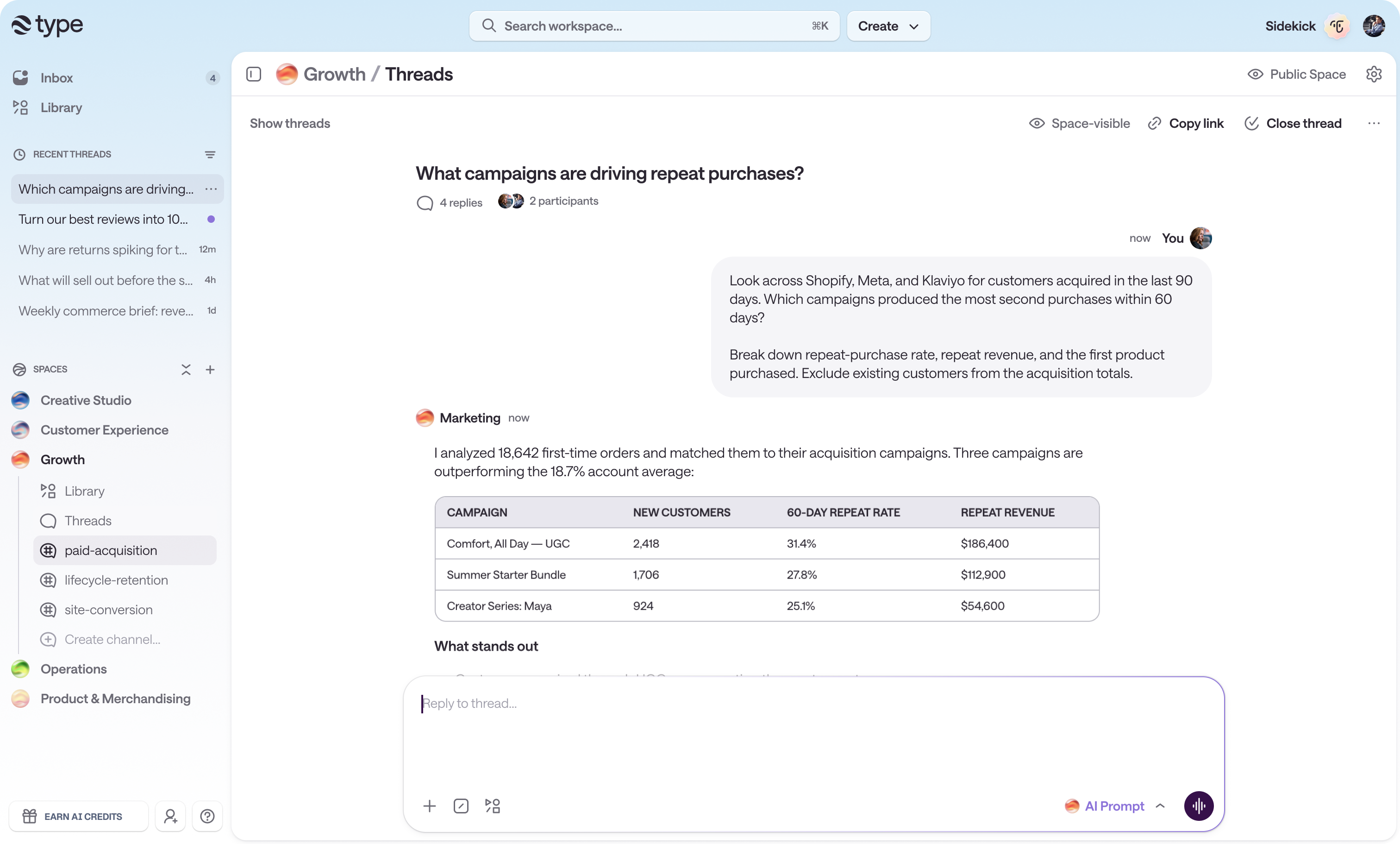
A Type Growth space with a shared thread where a teammate asks which campaigns drive repeat purchases and an agent answers with analysis across Shopify, Meta, and Klaviyo
A shared Type thread. The agent works in the channel, so the whole team sees the question, the analysis, and the answer.

Short answer

Type is a hosted AI workspace built for a whole company, not just its engineers. You sign in, pick a prebuilt role blueprint, connect the tools you already use, and your team works with that agent from the web, the Mac app, or Slack. Nothing to deploy and nothing to keep running.

Buzz is an Apache 2.0 project from Block that puts people and agents in shared channels over the Nostr protocol. It is labeled a developer preview, and its README calls it "another AI-adjacent developer tool" in those words. Running it yourself means standing up Postgres, Redis, an S3-compatible object store, a git volume, and TLS termination, though a one-click Railway template shortens the initial deploy. Chat and agents live in the desktop app, so the browser client covers repositories and invites only. Agents run on the laptop of whoever started them, so an agent stops when that machine sleeps.

Pick Buzz if self-hosting on your own infrastructure is the requirement, your use cases are engineering ones, and you have engineers who want to run a relay. Pick Type if you want marketers, support, sales, and ops using agents alongside engineering this afternoon, from the tools they already have open, with nearly 1,000 integrations an admin controls centrally.

What decides it

The three differences that decide it

Everything else is detail. These are the structural choices you cannot configure your way out of later.

Who runs the software

Type

Type runs it. Sign in and start working, with no relay, database, object store, or TLS to operate and no keys to custody.

Buzz

You run it, or Block's hosted preview does. Self-hosting asks for Postgres, Redis, an S3-compatible object store, a git volume, and Caddy, plus two Nostr keypairs before the first message. A one-click Railway template shortens the deploy without changing who operates it.

Where your team can work

Type

Type works in any browser, in a Mac app that can drive your own logged-in browser, and inside the Slack you already run. Adopting it does not mean migrating off your chat tool.

Buzz

Buzz needs the desktop app for chat and agents, and it is the chat app, so adoption means moving conversations into it. Its browser client covers repositories and invites only, and the Flutter mobile app has no published build to install.

Who the agent belongs to

Type

A Type agent is the channel's. It runs on a cloud computer that keeps working with every laptop closed, and anyone in the channel can pick up the thread.

Buzz

A Buzz agent is a process on one person's laptop. It stops when that machine sleeps, and opening it to the channel warns that anyone can then reach that person's files and accounts.

Out of the box

Type is already running. There is nothing to stand up.

Buzz hands you a relay to operate. Block's own deployment guide is honest about the shape of that: one Rust binary, Postgres, Redis, an S3-compatible object store, a git data volume, and Caddy in front of it for certificates. Block also publishes a one-click Railway template, which is a genuine shortcut and worth knowing about. It gets the relay running; it does not make the relay someone else's job. You still generate two Nostr keypairs before the first message is ever sent, and you pick the relay URL carefully, because that URL is the community's identity and switching it later starts you over with an empty community.

Type skips that entire category of work. You sign in with a work email and land in a Space, which is a shared computer for a team with its own channels, connections, skills, memory, and automations. Pick one of six blueprints and you inherit a working setup instead of an empty room: Marketing Manager, Sales Operations, Support Specialist, Product Engineer, Data Analyst, or HR Partner, carrying 21 skills and 16 scheduled automations between them. Nothing connects or fires until you approve it, so the first five minutes are review rather than configuration.

The practical difference shows up in who can start. Buzz needs someone who is comfortable with Docker Compose, database migrations, object storage credentials, and TLS. Type needs someone with a work email.

  • No Postgres, Redis, object store, git volume, or TLS termination to operate or upgrade
  • No relay key or agent key to generate, store, and back up
  • Six prebuilt role blueprints carrying 21 skills and 16 scheduled automations
  • Connections and automations stay off until you approve them

Who it is for

Type is for the whole company. Buzz is for engineers.

Buzz is candid about its audience. Its README calls it "another AI-adjacent developer tool. We're sorry." The capabilities it leads with are opening repos, sending patches, and reviewing code, and every worked example it offers is an engineering one: a feature branch that becomes a room, CI posting results, an agent running a first-pass code review, a release note drafted from merged pull requests. Git is a first-class citizen through NIP-34. That is a real strength, and it is aimed squarely at people who write software.

Type starts from a different assumption: the people who most need an agent are often the ones who will never open a terminal. The six blueprints are Marketing Manager, Sales Operations, Support Specialist, Product Engineer, Data Analyst, and HR Partner, so engineering is one seat at the table rather than the whole table. Nothing in the first-run path asks for a keypair, a Docker command, or a config file.

The local-versus-cloud split follows from that. A Buzz agent is a process on somebody's laptop, which is a reasonable default when your users are engineers with capable machines and terminals already open. Type puts the agent on a shared cloud computer per Space, which is what makes it usable by someone whose laptop is a work-issued MacBook they close at 5pm, and what lets a scheduled report run at 7am with everyone asleep.

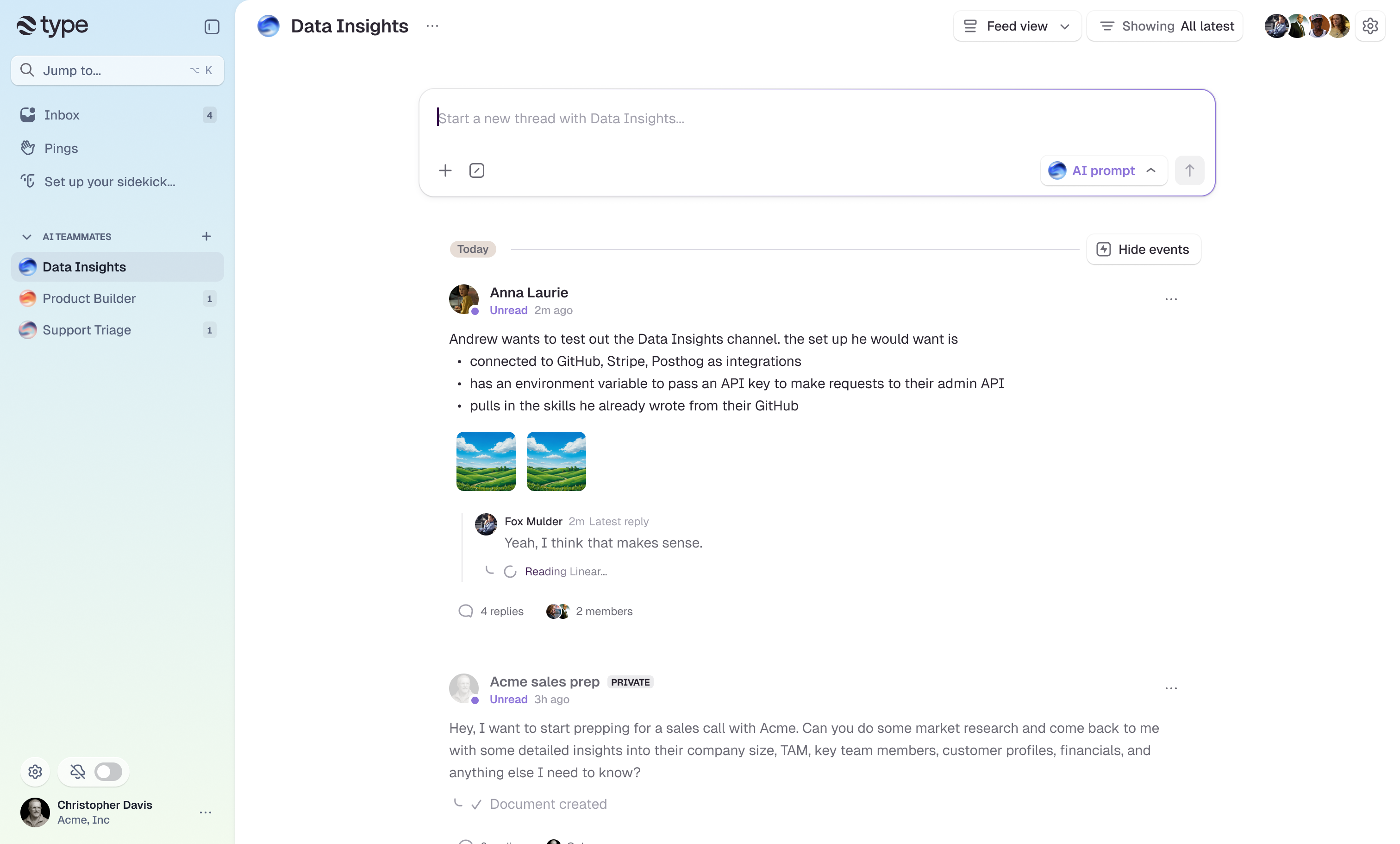
The Type workspace running in a browser with Data Insights, Product Builder, and Support Triage listed as AI teammates in the sidebar
AI teammates for different functions, each with its own Space. No terminal in the first-run path.
  • Blueprints for marketing, sales, support, data, HR, and engineering
  • No keypair, Docker command, or config file to get started
  • Cloud compute per Space instead of a process on one person's laptop
  • Scheduled work runs with every laptop closed

Work anywhere

Your team reaches Type from wherever they already are

Buzz is a desktop app. The relay does serve a browser client, and that client covers repository browsing and invite acceptance. Buzz's own documentation notes it has no pull request or issue pages. Chat, channels, and agents are desktop features, so every person you want in a conversation installs software first, on Windows through an unsigned binary that triggers a SmartScreen warning. The Flutter mobile app is further along than it looks, with working chat and agent-activity screens across 10 feature areas against 29 on desktop, but it has no published build on any channel, which leaves compiling it yourself as the only route to a phone.

Type meets people where they work. The full workspace runs in a browser with nothing installed. The Mac app adds the ability for an agent to drive your own logged-in browser session, which is useful for tools that have no API. Slack carries the rest: mention an agent in a channel, route a Slack user group to a Space, or DM Sidekick as a native Slack assistant that answers with the same context, skills, and memory it has in Type. An agent can even pause mid-task and ask a clarifying question through a Slack modal.

That Slack path matters more than it sounds, because it changes what adoption costs. Buzz is the chat app, so bringing it in means moving conversations into it and getting everyone to install it first. Type does not ask for that trade. It connects to the Slack you already run, so the channels stay where they are and the coworker who will never install another chat app still gets to use the agent. Teams move over gradually instead of on day one, and phone notifications work today rather than waiting on a mobile release. Buzz has no Slack integration, and while a relay-side push gateway exists it is Apple-only with no published mobile build to receive from it.

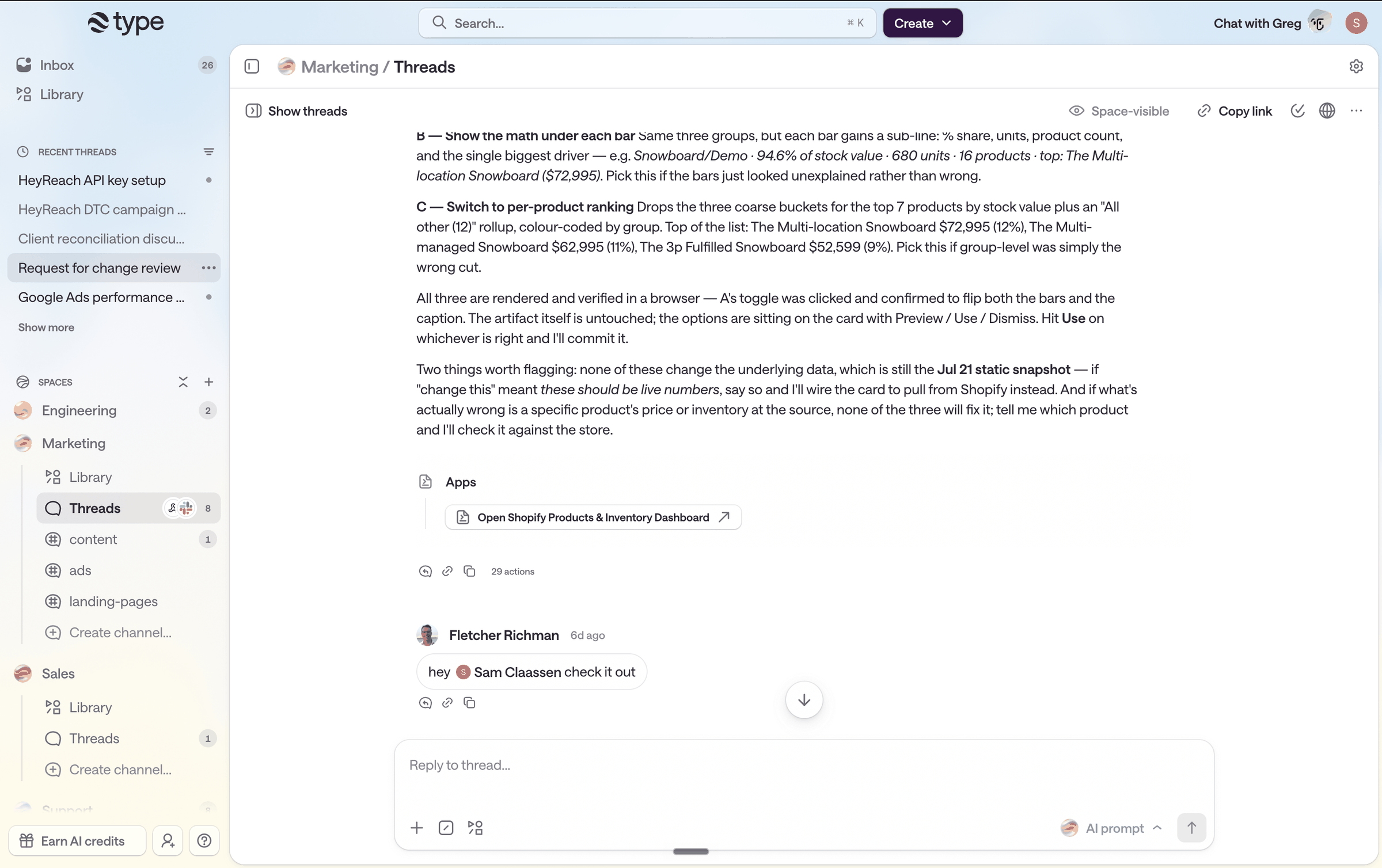
A Type Marketing Space whose Threads channel shows a Slack connection icon, with an agent's analysis, a linked Shopify dashboard app, and a teammate reply in the thread
A Marketing Space with Slack connected to the channel. The team keeps working in Slack while the agent's work lives in Type.
  • Full workspace in any browser, no install required
  • Mac app for desktop and browser control, with an iPhone app coming
  • Slack mentions, user-group routing, Sidekick DMs, and interactive approval modals
  • Documents, apps, and threads open from a link for anyone with access

Shared agents

One agent the whole team uses, running on a computer that never sleeps

This is the deepest architectural split between the two products. In Buzz, an agent is a local process the desktop app spawns. Block describes the consequence in its own remote-agent document: the agent's body is borrowed, running only while a desktop app runs, on hardware that sleeps when a human does. Remote agents that would fix this are a spec in review.

Sharing a Buzz agent carries a second cost. Buzz shows a persistent warning whenever you do, and the shipped text is unambiguous: anyone can use this agent to access your computer, including files, accounts, and connected tools. That warning is correct and responsible, and it also explains why teams end up with one agent per laptop rather than one per team.

Type agents run in the cloud on a persistent computer with files, a shell, and a browser. A scheduled report runs at 7am whether or not anyone is awake. Work one person starts is work anyone in the channel can read, continue, or correct, because the thread, the files, and the tool history are all shared. Agents can operate a full desktop and record video of what they did, and they can spin up sub-agents to work through parts of a task in parallel.

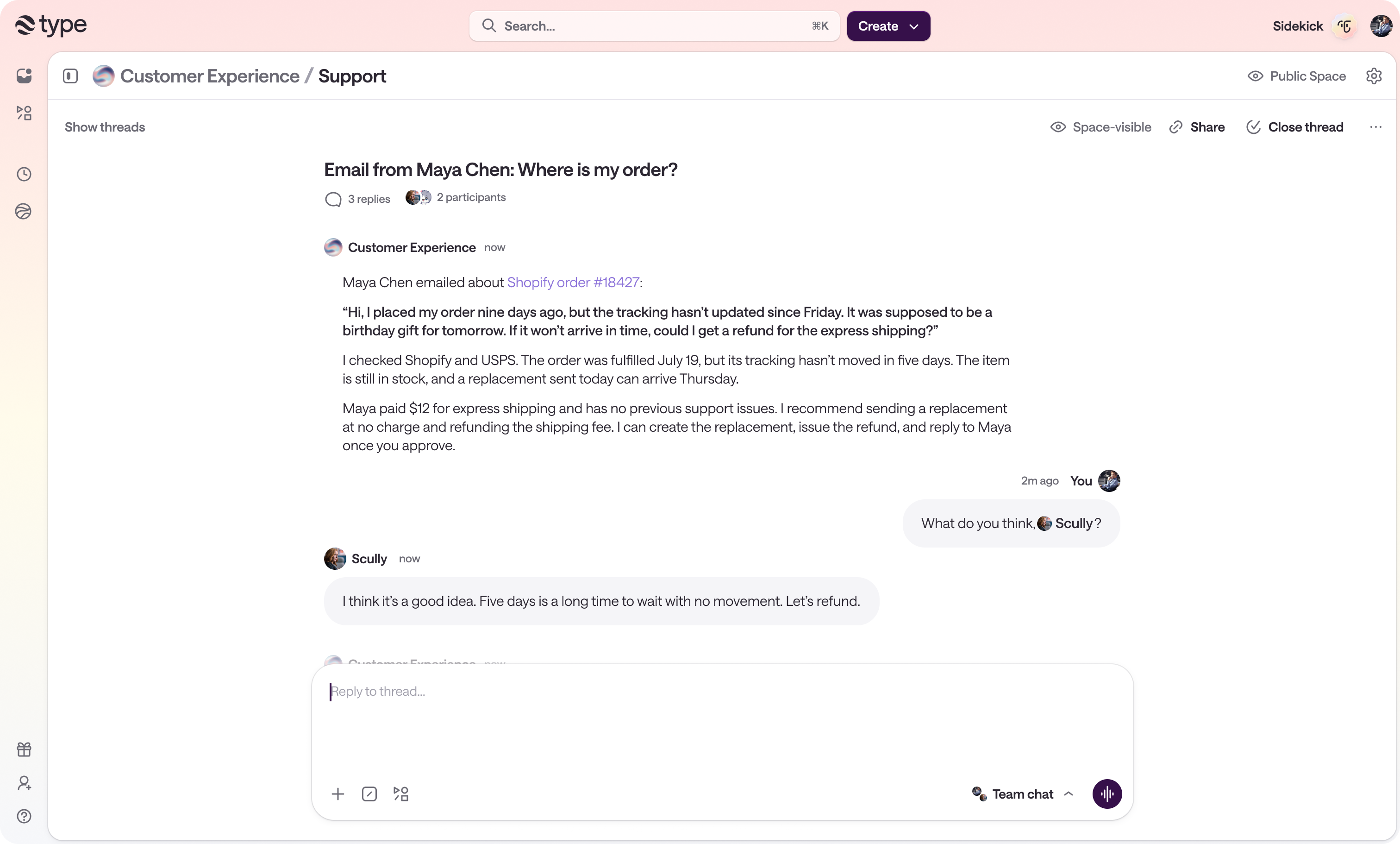
A space-visible Type support thread where an agent reviews a late Shopify order, recommends a free replacement and a shipping refund, and two teammates discuss the recommendation before approving it
The agent's work and the team's decision in one thread, so anyone in the channel can read it or take it over.
  • Cloud agents with a persistent computer, files, shell, and browser
  • Scheduled and triggered work runs with every laptop closed
  • Anyone in the channel can pick up a thread someone else started
  • Desktop control with optional video recording of the agent's session
  • Sub-agents split large tasks and report back

Real work, real tools

Nearly 1,000 integrations your admin controls, instead of MCP configs on each laptop

Buzz has no connector catalog. Integration happens at the agent layer through MCP servers that each person configures on their own machine, capped at 16 per session, and a workflow's only outbound action to the wider world is a generic webhook call. Nobody can see the full picture of what is connected, and nobody can change it centrally. If someone leaves, the tools they wired up leave with their laptop.

Type ships nearly 1,000 native integrations across 16 categories, managed org-wide rather than per machine. An admin connects a tool once and assigns it to the Spaces that should have it, with OAuth or an encrypted API key, revocable whenever. Personal and organization connections stay separate, so an agent acts with the access of the person and conversation that started the work rather than everything connected in the workspace. Anything not in the catalog connects through a custom API connector with no middleware to write. Google Drive scopes down to specific files and folders, and a broken connection reconnects in place.

Automation has the same spread. Type triggers on a schedule, a webhook, an app event, an RSS feed, a Slack message, or an email sent to the Space's own inbound address. Buzz's cron scheduler works, and its approval gates do not: the engine logs that approval gates are not yet implemented and marks the run Failed, and two more workflow actions, send_dm and set_channel_topic, return NotImplemented.

The part of Type that gets the least attention and pays off the most is skills: reusable procedures your team keeps improving. Each has an owner and version history, a coworker's edit arrives as a change request the owner approves, and each reports 30-day usage, top users, and run history. Teams wanting engineering rigor can keep a GitHub registry as the source of truth. You can also push a live Claude Code or Codex session into a Space from the CLI and continue it together, or upload .skill files in the format Claude Code and Claude Desktop use.


  • Nearly 1,000 native integrations across 16 categories, assigned per Space
  • Custom API connector for anything else, with no code or middleware
  • Six automation trigger types, including a per-Space inbound email address
  • Version-controlled skills with owner approval and 30-day usage metrics
  • Import Claude Code and Codex sessions, and connect outside clients over hosted MCP

Control

Permissions your org can reason about

Buzz states its model plainly, and it is a narrow one. The relay enforces all access control, and channel membership is the only gate. Membership is administered by public key through CLI subcommands for listing, adding, and removing members. The relay owner is the single account the tooling refuses to remove, and changing it means editing the relay's configuration and restarting the service. Identity is a private key, every agent needs its own, and Block's terms say a lost key can mean permanently losing the account and its content.

Type separates personal connections from organization connections, so a tool one person authorized does not silently become available everywhere. An agent acts with the access of the person and the conversation that started the work rather than inheriting everything connected in the workspace, which is the property that keeps a shared agent from becoming a lateral path into systems someone should not reach. Shared artifacts carry a capability model spanning read, edit, suggest, manage, publish, and access requests, and public links use tokens you can revoke at any time. When a connection breaks, reconnecting repairs it in place and every Space that used it keeps working.

Neither product ships SAML or SCIM today, so this is a comparison of what the permission model can express rather than a checkbox contest. Type's answer is org-level connections with per-Space assignment and inherited-access agents. Buzz's answer is which channels you are in.

  • Organization connections assigned per Space, separate from personal ones
  • Agents inherit the requester's access instead of every connected tool
  • File-level and folder-level scoping for sensitive sources like Google Drive
  • Revocable OAuth and API-key connections, repaired in place when they break

Cost

Free software is not the same as a low total cost

Buzz is free and Apache 2.0, and its hosted service has no paid tier. That is a real advantage and we are not going to argue with it. What free covers is the software. You still pay your model provider, because Block's terms state that Block does not provide, resell, host, or guarantee access to any AI model and that you owe all fees your provider charges. Self-hosting adds Postgres, Redis, object storage, a host, certificate management, upgrades across a repo that moved from v0.5.0 to desktop-v0.5.5 in seven days, and the engineer whose week that becomes.

Type Basic is $50 per month for 2 team members and $100 of included AI usage. Pro is $100 for 4 members and $200 of usage. Enterprise plans cover 20, 40, or 60 members for $250, $500, or $750 with twice that price in included usage. AI is metered at the provider's published API rates, and requests through connected Claude or ChatGPT subscriptions do not use the workspace allowance.

Full comparison

Type and Buzz, feature by feature

Grouped by the decisions teams actually make when they evaluate the two. Open a section to see the rows.

Getting started5 comparisons

Who it is built for

Type

Anyone on the team. The blueprints cover marketing, sales, support, data, HR, and engineering, and nothing in the first-run path asks for a terminal.

Buzz

Engineers. The README calls it "another AI-adjacent developer tool," and the capabilities it leads with are opening repos, sending patches, and reviewing code. Every worked example in it is a branch, a CI run, or an incident.

Setup

Type

Sign in and start. There is no server to provision, no database to run, and no key to generate before your first message.

Buzz

Running your own relay means Postgres, Redis, an S3-compatible object store, a git data volume, and Caddy for TLS. A one-click Railway template shortens the deploy, and you still own the relay, its upgrades, and its keys afterward.

Time to first useful work

Type

Six prebuilt blueprints, Marketing Manager, Sales Operations, Support Specialist, Product Engineer, Data Analyst, and HR Partner, arrive with 21 skills and 16 scheduled automations between them.

Buzz

You create channels and register each member and agent by public key. There are no prebuilt roles, skills, or automations to start from.

Product maturity

Type

Generally available and paid, with published pricing and a 14-day trial.

Buzz

buzz.xyz is labeled DEVELOPER PREVIEW and the README says plainly that it is not finished. As of 7 August 2026 the repo carries roughly 900 open issues and more than 1,200 open pull requests.

One-way setup choices

Type

Spaces are renameable and mergeable. An admin can merge two Spaces and keep the threads, artifacts, skills, and tasks.

Buzz

The relay URL is the community identity. Block's guide warns to set it before onboarding members, because changing it later means starting over with a new empty community.

Where your team works7 comparisons

Browser

Type

Full workspace in the browser. Channels, threads, agents, documents, and apps all work with nothing installed.

Buzz

The relay serves a browser client scoped to the repository browser plus invite acceptance. Buzz's own docs note it has no pull request or issue pages. Chat and agents require the desktop install.

Desktop

Type

Mac app, with the agent able to drive your own logged-in browser session for work that needs it.

Buzz

Tauri app for macOS, Linux, and Windows. The Windows build ships unsigned, so SmartScreen warns on first launch. No Linux ARM64 build.

Mobile

Type

iPhone app coming. Until then the mobile browser works, and Slack covers phones today.

Buzz

A Flutter app is in the repo with real chat and agent-activity screens, but no published build on any channel. No App Store, Play Store, TestFlight, or APK release exists, so mobile means building from source. Mobile covers 10 feature areas against 29 on desktop.

Adopting it without a migration

Type

Type sits alongside Slack rather than replacing it. Connect the two and your team keeps its existing channels, so the people who will not switch chat apps still reach the agent. Teams move over gradually instead of on day one.

Buzz

Buzz is the chat app. Adoption means moving conversations into Buzz, and everyone you want in a thread installs the desktop app first.

Slack

Type

Mention an agent in a channel, route a Slack user group to a Space, or DM Sidekick as a native Slack assistant with the same context, skills, and memory. Agents can pause and ask a question through an interactive Slack modal.

Buzz

No Slack integration. Buzz is the chat app, so conversations have to move into Buzz.

Email

Type

Every Space has an inbound email address, so someone outside the workspace can start a thread without an account or an install.

Buzz

No email path in. Reaching an agent means being a channel member on the relay with a registered key.

Notifications on your phone

Type

Slack carries mentions and agent replies to any device your team already has notifications on.

Buzz

A push gateway exists on the relay side and is Apple-only, with no Android path in it. There is no published mobile build to receive those pushes, and the persona pack spec still teaches agents to poll for new messages.

Agents6 comparisons

Getting the agent to answer

Type

The agent replies by default. A classifier decides when it is being asked something and stays quiet during human back-and-forth, and you flip the composer to Team message when you want people only.

Buzz

You @mention it every time. Buzz's harness queues mention events per channel and holds one prompt in flight at a time, so an unmentioned question goes unanswered.

Where agents run

Type

Agents run in the cloud on a persistent computer with files, a browser, and a shell. They keep working when everyone closes their laptop.

Buzz

Block's own remote-agent spec describes the problem: an agent's body is borrowed, it runs while a desktop app runs, on hardware that sleeps when a human does. Remote agents are a spec in review, not a shipped feature.

Sharing an agent with the team

Type

One agent serves the whole channel. Anyone can hand it work, read what it did, and pick up a thread someone else started.

Buzz

Opening an agent to the channel shares the host machine. The shipped warning reads: anyone can use this agent to access your computer, including files, accounts, and connected tools. In practice each person runs their own copy.

Model and harness choice

Type

Claude and Codex, with the harness, model, reasoning level, and speed selectable per thread, as a Space default, and per automation.

Buzz

Any agent that speaks ACP over stdio, with twelve documented presets including goose, Claude Code, and Codex. Broader harness support than Type, and every harness is configured per machine.

What an agent can do

Type

Operate a full desktop and record video of exactly what it did, drive a browser, run code, build documents, spreadsheets, decks, images, and video, and spin up sub-agents to work in parallel.

Buzz

Chat, git operations over NIP-34, and YAML workflows. Capability past that depends on which MCP servers each person configured locally, capped at 16 per session.

Model billing

Type

Metered at the provider's published API rates, or covered entirely by a personal Claude or ChatGPT subscription you connect.

Buzz

You supply the model. Block's terms state that Block does not provide, resell, host, or guarantee access to any AI model, and you owe all fees your model provider charges.

Integrations and automation6 comparisons

Integration catalog

Type

Nearly 1,000 native integrations across 16 categories, connected once and assigned to the Spaces that should have them. Anything else connects through a custom API connector with an API key or OAuth 2 credentials.

Buzz

No connector catalog. Integrations are whatever MCP servers each teammate wires up on their own machine, and outbound reach from a workflow is a single generic webhook call.

Who manages connections

Type

An admin connects a tool once for the organization and assigns it to the Spaces that should have it. Personal and organization connections stay separate, every connection is revocable, and a broken one reconnects in place without re-setup.

Buzz

Each person configures their own MCP servers locally, capped at 16 per session. There is no org-wide catalog, no central assignment, and no way for an admin to grant or revoke a tool for the team.

Automation triggers

Type

Schedule, webhook, app event, RSS feed, Slack, and a per-Space inbound email address so an outside person or system can start a thread.

Buzz

Cron schedules and webhooks work. Approval gates do not: the workflow engine logs that it hit an approval gate, calls it not yet implemented, and marks the run Failed. Two more actions, send_dm and set_channel_topic, return NotImplemented.

Reusable team knowledge

Type

Skills have an owner and version history, a coworker's edit becomes a change request the owner approves, and each skill shows 30-day usage, top users, and run history. A GitHub registry can act as the source of truth.

Buzz

Personas and packs live in files. Agent memory is encrypted per agent to the agent and owner pair, so it is private recall rather than shared team knowledge.

Documents and apps

Type

Co-edited documents with live presence, import from Word, Markdown, Google Docs, and Notion, plus AI-built apps with persistent data that stay in sync for the whole team.

Buzz

Canvases and notes. No document import, and no app runtime.

Bringing existing work in

Type

Push a live Claude Code or Codex session into a Space from the CLI, upload .skill files in the same format Claude uses, and connect outside AI clients through a hosted OAuth-protected MCP server.

Buzz

Start fresh. Identity moves between communities, and history does not follow it.

Administration and security6 comparisons

Access model

Type

Personal and organization connections are separate, and an agent acts with the access of the person and conversation that started the work rather than everything connected in the workspace.

Buzz

VISION.md states it directly: the relay enforces all access control, and channel membership is the only gate.

Managing members

Type

Members and admins are managed in workspace settings, and every connection is revocable.

Buzz

Channel membership is administered by public key through CLI subcommands for listing, adding, and removing members. The relay owner is the one account the tooling refuses to remove: changing it means editing the relay's configuration and restarting.

Account recovery

Type

Ordinary sign-in. A lost laptop means signing in again.

Buzz

Identity is a Nostr private key and every agent needs its own. Block's terms state that if your key is lost you may permanently lose access to your account and associated content, and that anyone holding your key can act as you.

Scoping sensitive tools

Type

Granular scoping where it matters, including file-level and folder-level selection for Google Drive instead of broad document access, and revocable public links on shared artifacts.

Buzz

An agent process receives its own private key by design. Block lists malicious-provider containment as an explicit non-goal.

Audit and abuse controls

Type

Reconnecting a broken connection repairs it in place, and agents surface a reconnect card rather than failing quietly.

Buzz

A hash-chain audit log exists, and Block notes it is tamper-evident but not tamper-resistant because anyone with database write access can recompute it. Rate limiting is implemented on Redis and enforced at the relay, with a fixed-window design its own source warns allows up to double the limit in a burst at window boundaries.

Getting your data out

Type

Data lives in your workspace rather than a third-party service. Documents pull down as Markdown from the CLI, and agents produce ordinary .docx, .xlsx, and .pptx files you can take with you.

Buzz

No self-service export. The hosted support page directs you to email help@buzz.xyz for a copy, correction, or deletion of your data.

Cost2 comparisons

Price

Type

Basic is $50 per month for 2 team members and $100 of included AI usage. Pro is $100 for 4 members and $200 of usage. Enterprise plans cover 20, 40, or 60 members with larger allowances.

Buzz

Free. Apache 2.0, and the hosted service has no paid tier today.

What you actually spend

Type

AI usage is metered at provider published rates. Connect a Claude or ChatGPT subscription you already pay for and those requests are not metered against the workspace at all.

Buzz

Free software plus your model provider bill, plus Postgres, Redis, object storage, and a host if you self-host, plus the engineering time to run all of it.

Where Buzz is the better choice

Buzz is a serious piece of engineering and there are teams it fits better than Type. We would rather say so than pretend the tradeoff does not exist.

  • It is genuinely open source under Apache 2.0, and the hosted service is free with no paid tier today.
  • If everything has to run inside infrastructure you control for data-residency or regulatory reasons, self-hosting Buzz answers that and Type does not.
  • It supports more agent harnesses than we do: twelve documented presets, including goose, and any agent that speaks ACP over stdio.
  • Every agent carries its own cryptographic identity, which is a cleaner model than most products offer.
  • Git is a first-class citizen through NIP-34, with hosted repositories, patches, and branch protections in the same place as the conversation.
  • Block builds on it internally and says so, and the project moves very fast in the open.
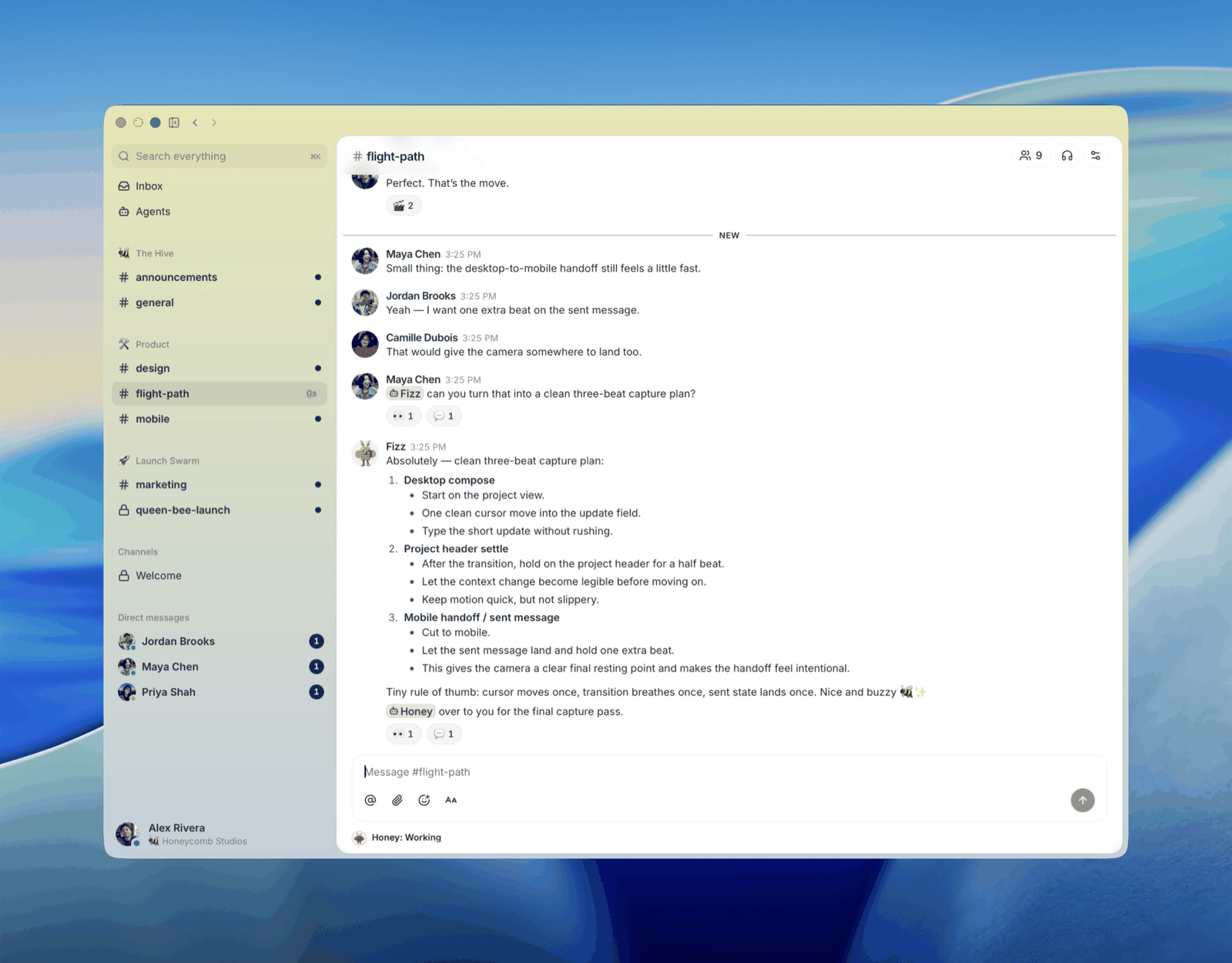
A Buzz project channel where people and an agent coordinate on a release plan
Buzz's own screenshot of a project channel. Source: block/buzz README, Apache-2.0.

One detail worth knowing if you evaluate it: Block tells its own employees not to use the open-source release and to use an internal build instead, which comes pre-wired to Block's relay and agent provider. The version Block runs in production is configured differently from the one you would download.

FAQ

Questions people ask about Type and Buzz

What is Buzz?

Buzz is an open-source project from Block that puts people and AI agents in shared channels, built on the Nostr protocol with a Rust relay, a Tauri desktop app, and a Flutter mobile app in development. It is Apache 2.0 licensed, and the hosted service at buzz.xyz is labeled a developer preview and is free.

Is Type a Buzz alternative?

Yes, for teams that want the shared people-and-agents channel model without operating it. Type is a hosted AI workspace with the same premise and a different delivery: built for a whole company rather than just its engineers, cloud-first instead of running on laptops, no relay to run, a full browser client, cloud agents the whole team shares, nearly 1,000 integrations an admin controls centrally, and a Slack integration so you do not have to replace your chat tool to adopt it.

Does Buzz require self-hosting?

Not strictly. Block runs hosted relays at buzz.xyz, free, invite-only, limited to three communities per account. Hosted communities are not end-to-end encrypted. If you want your own instance, the relay needs Postgres, Redis, an S3-compatible object store, a git data volume, and TLS termination. Block publishes a one-click Railway template that handles the initial deploy, after which the relay and its keys are yours to run.

Can I use Buzz in a browser?

Only partly. The relay serves a browser client scoped to repository browsing and invite acceptance, and Buzz's own docs note it has no pull request or issue pages. Chat, channels, and agents require the desktop app. Type runs the entire workspace in any browser with nothing installed.

Does Buzz have a mobile app?

A Flutter app exists in the repository with working chat and agent-activity screens, but there is no published build on any distribution channel, including the App Store, Play Store, TestFlight, and direct APK. Mobile means building from source today, and it covers 10 feature areas against 29 on desktop. Type runs in a mobile browser now, reaches phones through Slack, and has an iPhone app coming.

Where do Buzz agents run, and can a team share one?

Agents run as local processes the desktop app spawns, so an agent stops when that machine sleeps. Block's remote-agent document describes exactly this limitation, and remote agents are still a spec in review. You can open an agent to a channel, and Buzz shows a persistent warning that anyone can then use it to access your computer, including files, accounts, and connected tools. Type agents run in the cloud on a persistent computer that the whole channel shares.

How does access control compare?

Buzz's VISION.md states that the relay enforces all access control and channel membership is the only gate, with membership administered by public key through the relay's admin CLI. Type separates personal from organization connections, assigns them per Space, and has agents act with the access of the person and conversation that started the work. Neither product ships SAML or SCIM today.

What happens if someone loses their key in Buzz?

Block's terms are explicit: because of the key-based identity model Block generally cannot recover, reset, or restore a lost private key, and if your key is lost you may permanently lose access to your account and associated content. Every agent needs its own keypair, and the agent's secret is not stored and cannot be recovered. Type uses ordinary accounts, so a lost laptop means signing in again.

Do I have to replace Slack to use Type?

No. Type connects to the Slack you already run, so your channels stay where they are. Mention an agent from Slack, route a Slack user group to a Space, or DM Sidekick as a native Slack assistant with the same context, skills, and memory it has in Type. Teams adopt Type gradually rather than migrating on day one. Buzz has no Slack integration and is itself the chat app, so adopting it means moving conversations into it.

Is Buzz or Type better for non-technical teams?

Type. Buzz's README describes it as another AI-adjacent developer tool, and the capabilities it leads with are opening repos, sending patches, and reviewing code. Type ships blueprints for Marketing Manager, Sales Operations, Support Specialist, Product Engineer, Data Analyst, and HR Partner, and nothing in the first-run path requires a terminal, a keypair, or a config file.

Do I have to @mention the agent every time?

In Buzz, yes: its harness queues @mention events per channel, so an unmentioned question goes unanswered. In Type the agent replies by default, with a classifier that decides when it is being asked something and stays quiet during human back-and-forth. You switch the composer to Team message when you want people only.

How do the two handle integrations across an organization?

Type manages them org-wide: an admin connects a tool once and assigns it to the Spaces that should have it, personal and organization connections stay separate, and every connection is revocable. Buzz has no connector catalog, so integrations are MCP servers each person wires up on their own machine, capped at 16 per session, with no central way to see, grant, or revoke them.

How many integrations does Buzz have?

There is no connector catalog. Integration happens through MCP servers each person configures on their own machine, capped at 16 per session, and a workflow's only outbound action is a generic webhook call. Type has nearly 1,000 native integrations across 16 categories plus a custom API connector for anything else.

Which AI models and harnesses does each support?

Buzz supports any agent speaking ACP over stdio, with twelve documented presets including goose, Claude Code, and Codex, which is broader harness support than Type. You supply and pay for the model, since Block's terms state Block does not provide, resell, host, or guarantee access to any AI model. Type runs Claude and Codex with the harness, model, reasoning level, and speed selectable per thread, as a Space default, and per automation.

What does each cost?

Buzz is free and Apache 2.0, with no paid tier on the hosted service, and you pay your model provider plus any self-hosting infrastructure. Type starts at $50 per month after a 14-day free trial for 2 team members and $100 of included AI usage, scales to plans for 60 members, meters AI usage at provider published rates, and does not meter requests that run through a personal Claude or ChatGPT subscription you connect.

Is Buzz production ready?

Block uses it internally and says so, and buzz.xyz is labeled a developer preview while the README says it is not finished. The code is candid about the gaps: a workflow that reaches an approval gate is logged as not yet implemented and the run is marked Failed, and two workflow actions, send_dm and set_channel_topic, return NotImplemented. Block also tells its own employees to use an internal build rather than the open-source release.

People and agents in the same channels, working this afternoon.

Start with Type when you want shared agent channels the whole company can use, not just engineering, reachable from the browser, the desktop, or the Slack you already run, with nearly 1,000 integrations your admin controls and nothing to keep running.

Get started for free

14-day free trial. Plans start with 2 team members. No infrastructure required.